 Using the Component for Receiving Outbound IDocs
Using the Component for Receiving Outbound IDocs
Purpose
Using the IDoc Connector for XML component your application can receive outbound IDoc(s) as XML document(s). The component does the translation from IDoc to an XML document.
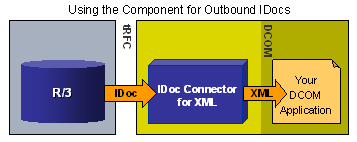
When receiving outbound IDocs, the IDoc Connector for XML component acts as an RFC server to the R/3 system that is sending the IDoc (Meaning that it receives RFC function calls from the R/3 system).
Prerequisites
See the details in the
Prerequisite Setup topic and in the ALE and IDoc documentation mentioned there.Process Flow
To use this feature of receiving outbound IDocs as XML documents you use the
SAPIDocProcessorOutbound object in your application.The Listen method is a blocking call, meaning that it waits for the IDoc indefinitely. We recommend that you use Listen within a separate process or thread, if you wish to not interrupt other processing in your application.
Once an IDoc is received, the Listen method terminates. If you wish to receive multiple IDocs, place the Listen method in a loop.
Action |
How to Perform |
Get a document ID for the document, and then get the XML document later. Use this process, for example, if you are getting multiple outbound documents, and you wish to get their count before actually getting the documents. |
|
Immediately get the resulting XML document |
Handle the IDocReceived2 event. This performs the same action as the two separate steps above. |
Result
In addition to supplying your program with the XML document(s), the component also saves the document(s) as XML file(s) in the system temp directory.
Visual Basic Example
The following example waits for IDocs in a loop, and then gets the resulting XML document(s).
'Declare the outbound object,
' subscribing to all its events:
Dim WithEvents idoc As SAPIDOCPROCLib.SAPIDocProcessorOutbound
Private Sub GetDoc_Click()
'Create the instance of the outbound object:
Set idoc = New SAPIDOCPROCLib.SAPIDocProcessorOutbound
On Error GoTo bad_news
' Run Listen in a loop to receive multiple IDoc documents.
'...
idoc.Listen ("IDOCSYS")
'IDOCSYS is an RFC Destination
'...
Exit Sub
bad_news:
MsgBox Err.Description & " " & Err.Source, vbCritical, Err.Number
Exit Sub
End Sub
' VB automatically creates the subroutines
' for handling all of the events of the object.
'If you choose to handle this routine (for the IdocReceived2 event)
' you get the XML document as soon as the IDoc document is received:
Private Sub idoc_IDocReceived2(ByVal idocxml As String)
'VB appends the string idoc_
' to create the name of the event handling routine
MsgBox idocxml
' Your program should do something more meaningful
' with the XML document
End Sub
'As an alternative,
' If you chose to handle the IDocReceived event,
' you would get only document ID,
' and then you can get the XML document in a separate step:
'Private Sub idoc_IDocReceived(ByVal Id As Long)
' MsgBox idoc.PickIDoc(Id)
'End Sub