 Personalizing the Possible Entries Help
Use
The possible entries help is a standard function available in the SAP System. Using the possible entries help, users can display a list of all possible values for a screen field.

In the SAP System, the possible entries help process flow is based on a
 search help from the ABAP Dictionary. Search helps are assigned to the screen fields for which they are to be available.
For example, the possible entries help for the Sold-to party field in transaction Create Sales Order (VA01) would be displayed as follows:

You can adjust a list and save settings that:
- Modify the behavior of all possible entries helps
- Modify the behavior of a single possible entries help
Procedure
To adjust a possible entries help, proceed as follows:
- Call the possible entries help for any field.
- Click the right mouse-button or choose the Ctrl-F4 key combination. Choose Personalize from the context menu.

The Personalize option of the context menu is only available on the hit list.
The following dialog box appears:
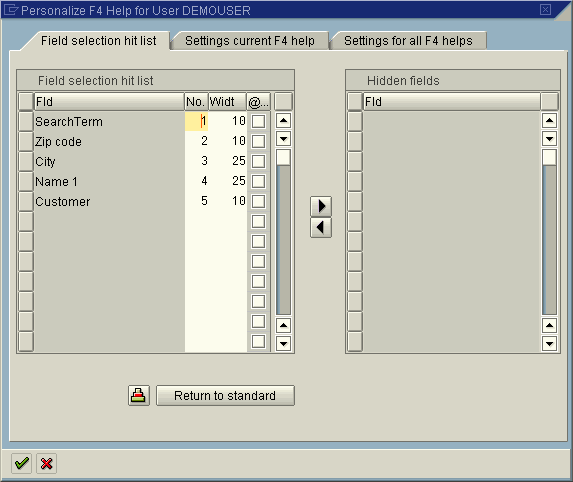
- Make your settings for the current possible entries help or for all possible entries helps. Note the following information.
Settings you can make globally for all possible entries helps or for the current possible entries help:
Display of personal value list: You can specify if your personal value list should be displayed automatically if one exists.
System behavior if only one hit: If the system finds one hit only for the possible entries help, you can either display this hit on the hit list or have it returned directly to the screen.
Maximum width of hit list: You can determine the maximum width (number of characters) of the hit list in order to adjust the possible entries help to small monitors.
Maximum number of hits to be displayed: You can determine the maximum number of lines that the hit list should contain when called for the first time.
Settings you can make additionally for a single possible entries help only:
Hide and swap columns: You can hide columns in the hit list. The list of hidden columns is saved. These columns are not displayed any more when you call up the possible entries help the next time. This allows you to hide columns that you do not need and make the hit list easier to read. You can also swap columns on the hit list.
Skip selection screen: You can specify if the hit list is to be displayed immediately or if a selection screen should be displayed where you can further restrict the values.
Setting you can make globally for all possible entries helps only:
Display: You can determine whether the possible entries help is to be displayed in a search help control, in an R/3 dialog box or in accordance with the system default.
For more information on how your settings affect the behavior of the possible entries help, see the F1 help for the individual parameters.