 Inspection Results for Multiple Samples
Inspection Results for Multiple Samples
Use
In addition to recording inspection results for characteristics, you can also record results for independent and dependent multiple samples. To do so, you must specify the use of partial samples in the sampling procedure.
Independent Multiple Samples
For each inspection characteristic, you can record results for several samples. You also specify the number of samples in the sampling procedure.
When you set the indicator for Independent multiple sampling in the sampling procedure, you define an additional valuation rule for independent multiple samples. You can record inspection results for individual samples and then valuate each sample.
For more information, see
 Independent Multiple Samples.
Dependent Double and Multiple Samples
If the result for the current sample lies between the acceptance and rejection number during an attributive inspection, the sample size is increased based on the sampling scheme. If you have recorded results for the new samples, the samples are re-evaluated based on the updated valuation parameters.
For more information, see
Dependent Multiple Samples.
Prerequisites
When processing multiple samples, the following prerequisites must be fulfilled:
Features
You can use the following functions:
Sample Results for Characteristic-Based Results Recording
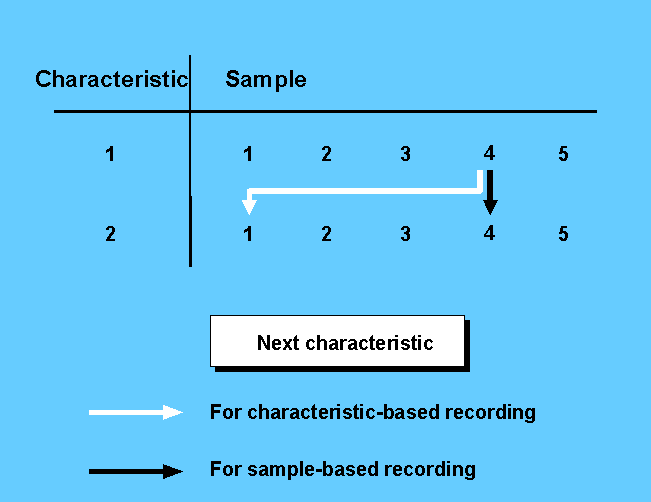
You can also record sample results for a characteristic with partial samples during characteristic-based results recording. In this case, the navigation is based on the characteristic. This means that when you switch to the next characteristic, the system always offers the first sample of the next characteristic for processing.
Sample Results for Sample-Based Results Recording
For sample-based results recording the navigation is based on the sample. This means that when you switch to the next characteristic, the system always offers the current sample of the next characteristic for processing.

Sample-based results recording is ideal for an inspection during production. You can record results for specific characteristics at specific time intervals. For example, only characteristics 10, 30, and 50 should be inspected and results should be recorded for the samples.
The following graphic clarifies the difference between characteristic-based and sample-based navigation.
Activities
To call up sample-based results recording, choose Logistics ® Quality management ® Quality inspection ® Results ® For sample ® Record, Change, or Display.
If you are processing results for samples, proceed in analog for
results recording for an operation.On the initial screen Record Sample Results, there is a field for the Sample number. If you do not enter a sample number, the system determines the next available sample number from the start value parameters and the increment for the sample number allocation. These parameters are defined in Customizing for plant settings.
After you select a characteristic from the characteristic overview screen, the single screen for the characteristic sample appears. On this screen there is:
See also:
Creating Sampling Procedures