 Control Functions of the Investment Profile
Control Functions of the Investment Profile
Use
The most important control feature from the perspective of Investment Management (IM) is the investment profile. By assigning an investment profile to an order or WBS element, you make it into an investment measure.
Features
When you create an investment measure, the investment profile controls the following:
Asset under Construction
You make the following specifications in the investment profile:
Using this indicator, you control whether the system creates exactly one asset under construction per investment measure, or one asset under construction per assignment in the source structure. The system then charges all of the cost elements belonging to one source assignment to the source assignment’s own individual asset under construction. When you set this indicator, you can assign each investment profile its own default asset class per source assignment (in Customizing for Investment Management, choose Define Assignment of AuC Classes per Source Assignment).
For more information on the source structure, see
This indicator controls whether the periodic settlement and full settlement of investment measures should be by line item or by totals. Line item settlement has the following advantages:
The advantages of line item settlement, however, are offset by reductions in performance. Therefore, you should use line item settlement only if it is really needed.
Depreciation Simulation

You can only enter the default asset class manually if the investment measure is not released immediately after being created. When the investment measure is released immediately, the asset under construction is also created immediately (without your being able to change the asset class).

Functions of the Investment Profile
Activities
You maintain investment profiles in Customizing for Investment Management. Choose Internal Orders as Investment Measures or Projects as Investment Measures ® Master Data ® Define Investment Profile.
There are two ways of assigning an investment profile to an investment order. Either you can enter it directly in the master record of the order on the Investment tab page, or you can enter in a model order, also on the Investments tab page. The system determines the model order by the order type used when you create the order. For order types for investment measures, therefore, you should specify the following:
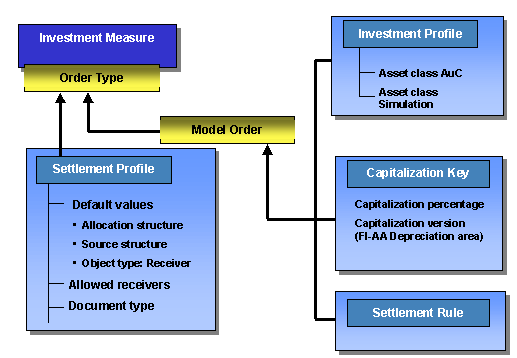
Control Elements of Order Type and Model Order
There are also two ways of assigning an investment profile to a WBS element. You can either enter it directly in the WBS element master record on the Investment tab page, or assign it by means of the project profile used when creating the WBS element.
You assign the investment profile to the project profile in the Customizing definition of the project profile (on the Controlling tab page). The system uses the investment profile specified in the project profile as a default when you create the project. The investment profile specified in the project definition is also used as a default when individual work breakdown structure (WBS) elements are created. For WBS elements that are not to be capitalized, you can manually remove the investment profile (on the Investment tab page).
You can also define orders and WBS elements as investment measures at a later date (after their initial creation). You do this by assigning an investment profile to them The system then automatically creates the accompanying asset under construction. However, this procedure is only possible if the order or WBS element has not yet been settled.
See also:
Implementation Guide (IMG) of Investment Management under Internal Orders as Investment Measures or Projects as Investment Measures ® Master Data ® Define Investment Profile.