 Authorization Levels for Versions
Authorization Levels for Versions
Use
The plan values of a version are usually subject to an approval process before becoming binding budget values. Often this approval process runs in parallel for several different plan versions at different levels of the investment program. For instance, a version at the highest level may be very close to being approved, whereas a new version is already being planned at a lower level.
Features
For this reason, you can assign an authorization level to your plan version. The authorization level limits the processing of plan values on the version to those users that have the authorization for this authorization level. You can increase the authorization level of a version by stages.
You can freely define the authorization levels in Customizing (for example, "0" to "9"). The authorization level is an authorization object for version-dependent activities (planning). In this way, you can assign certain system users the authorization for processing certain versions (Planning in Program
® Versions). There is a locking indicator in the Customizing definition of the authorization level. You can use this indicator to lock versions with a certain approval level to further planning.
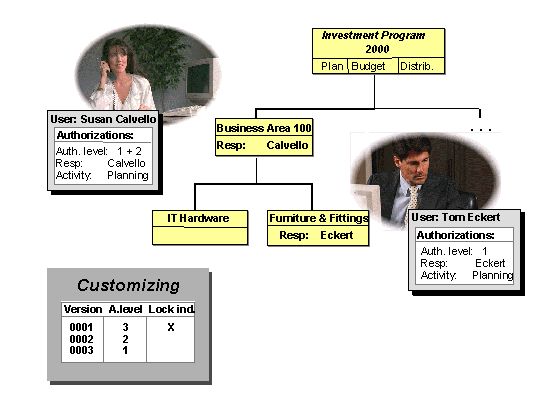
Approval Levels and Plan Versions
The graphic shows an investment program that is being planned with three versions. Version 1 is already locked. Only the user "Calvello" is allowed to work on version 2, since she has authorization for authorization level 2. The user "Eckert" does not have authorization for this authorization level. Therefore, he can only work on version 3 (the most current version).