 Master Data Maintenance
Master Data Maintenance
Use
An investment program consists of the following master data:
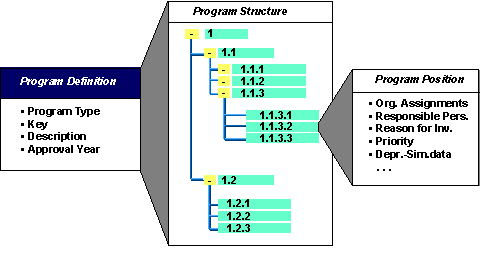
Master Data for Investment Program
Features
When you create the investment program definition, you first have to enter the program type. You can define any number of program types in Customizing for Investment Management (Investment Programs ® Master Data ® Define Program Types)
The program type classifies the investment program. Along with various control features for the planning and budgeting of the investment program, the program type also contains the CO object class (such as investment, overhead, production). Using this object class, you can manage different investment programs for the different CO object classes in parallel.
Program Positions
You can make the following entries for program positions on the different tab pages:
Tab Pages
Tab Pages |
Comments |
General |
Specifications such as the reason for investment, priority, and so on, can be used as summarization criteria in reports. |
Organizational units |
Organizational units can also be used as summarization criteria in reports. |
Depreciation simulation data |
The parameters you enter here can be used later, together with the plan values from the program, for the simulation of expected future depreciation. |
User fields |
You define the allowed values for your user fields in Customizing for Investment Management. Choose Investment Programs ® Master Data ® User Fields. |
Specifications Made Using Application Toolbar
Pushbutton |
Function |
Allowed measures |
You can specify whether orders, WBS elements, and appropriation requests are allowed to be assigned to the program position (only possible for end node positions). The system always proposes the measures allowed by the program type. |
Assignments |
You can assign measures or appropriation requests to the positions of the investment program. You can also make this assignment in master data maintenance for the measure or appropriation request. |
System/user status |
In addition to the system status, you can also set a user status, if this is allowed in the program type of the investment program. |
Coding Mask for the Program Position Key
The system assists in the creation of program positions by offering freely definable coding masks.
For more information, see
Coding Mask for the Appropriation Request Number , as well as the Implementation Guide (IMG) for Investment Management under Investment Programs ® Master Data ® Coding Mask for the Position Key.Classification System
In addition to the master data for the program position as provided by SAP, you also have access to the SAP classification system. This interface makes it possible to expand the master record of the program position almost indefinitely. Choose Extras
® Classification in master data maintenance of the program position to add an almost unlimited number of additional fields to the master record of the program position. This function also allows you to search for a specific program position later using a matchcode, based on the contents of such classification fields. However, you cannot currently obtain reports based on these additional fields.Language-Dependent Short and Long Texts
Since investment programs are valid for your entire corporate group, they are often processed by users in different countries and languages. Therefore, you can specify language-specific texts for the following:
You can set the language for your texts in the display or maintenance transactions for these objects. Choose Settings
® Select language. The language you select using this function is valid until you logoff. You can also specify the language for an individual user, using the set/get parameter IMS (System ® User profile ® Own data).