Basic Dates and Basic Values
Basic Dates and Basic Values
Use
The method for time-related revenue recognition uses several basic dates and basic values, which are used during the revenue recognition process. These basic dates and basic values determine how revenues are implemented for time-related items. The following basic dates and values are used:
Start of Accrual Period
The accrual period start date determines the beginning of the period, when the recognitions should be carried out. You choose the proposed date, by entering one of the following keys in the document item category field Acc. period start in Customizing.
Start of Accrual Period: Options
Option |
Description |
Blank character |
Not relevant |
A |
Proposal based on start of contract. If you choose this option, revenue recognition proposes the start date of the item sales contract as the start of the accrual period. |
B |
Proposal based on start of billing plan. If you choose this option, revenue recognition proposes one of the following dates as the start of the accrual period. · Milestone billing plan– The billing date of the first milestone · Periodic billing planThe system uses the earlier of the following two dates. – Start date of the billing plan – Start date of the first settlement period
|
End of Accrual Period
The accrual period end date determines the end of the period, when the recognitions should be carried out. Then end date comes from the sales document, which contains the posted item.
The table below describes the logical determination of the accrual end date for revenue recognition.
Determining the End of Accrual Date Hierarchy
Billing Plan Type |
Horizon |
End of contract date |
End of accrual period |
No billing plan |
Not available |
Yes |
End of contract date |
Milestone billing plan
|
Not available Not available |
No Yes |
Last milestone date End of contract date |
Periodic billing plan
|
No
No Yes
Yes
|
No
Yes No
Yes
|
Last settlement period end date End of contract date Last settlement period end date Last settlement period end date |
No. of Accrual Entries
The number of accrual entries is identical to the number of posting periods, which have been identified at company level for the accrual period of an item.
The table below contains examples for calculating the accrual period.
No. of Accrual Entries: Example Calculations
Start of accrual date |
End of accrual date |
No. of Accrual Entries: |
1.1.97 |
31.12.97 |
12 |
1.8.97 |
31.12.97 |
5 |
15.9.97 |
20.12.97 |
4 |
12 defined booking periods, one period for each month of a normal calendar year | ||
Calculation of Reset Total Value
This refers to the determination of total value of a sales document item for revenue recognition in the system. The billing plan type used for the sales document determines which reset total value is calculated by the system.
The calculation for all billing plan types is shown in the table below.
Calculation of Reset Total Value: Hierarchy
Billing plan type |
End of contract date |
Calculation of reset value |
No billing plan |
Not available |
Item net value |
Milestone billing plan
|
No
Yes |
Total value of all existing milestones Item net value |
Periodic billing plan |
N/Y |
Total value of all existing settlement periods |
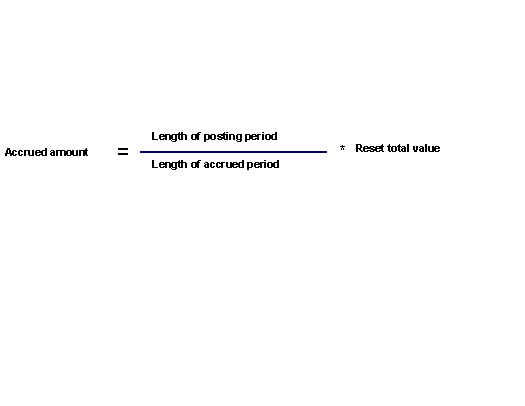
Calculating the Accrued Amount
The accrued amount is the amount, which revenue recognition posts for each item in the posting period in financial accounting.
Revenue recognition determines this amount by dividing the length of the posting period by the length of the accrual period and multiplying the resulting value by the reset total value. This invoice is shown as follows:
 Example: Standard Calendar Year
Your financial calendar contains 12 posting periods, which correspond to the 12 calendar months. At the same time you have a reset total value of 12000. If the length of your accrual period (in calendar months) is 12 and the length of your posting period one month, you can calculate your accrued amount as follows:
1000 = 1/12 *12000
Example: Non Standard Calendar Year
The table below shows a few posting examples, for companies whose financial calendar does not correspond to the normal calendar year:
Ex. |
Period |
Calculating period length |
Calculating the amount |
Amount per period |
1 |
1 May to 27 May |
27/31 or 0.87097 months |
0,87098/12 * 12000 |
870.98 |
2 |
28 October to 29 November |
33/31 or 1,0645 months |
1,0645/13 * 12000 |
982.62 |
3 |
29 June to 16 July |
18/30 or 0,6 months |
0,6/13 * 12000 |
553.84 |
The denominator for calculating the period is determined by the length of the calendar month, in which the posting period begins. | ||||