 Currency Changeover in Retail (IS-R)
Currency Changeover in Retail (IS-R)
Purpose
In addition to the local currency changeover, your company will be greatly affected by various further changeovers taking place during the dual currency phase (planned for 01.01.1999 - 30.06.2002).
Some of these changeovers will take place outside your company (carried out by business partners) and you will have to plan others within your company. In the first instance, your business partners (vendors or customers) will announce that they wish to start transacting business in euros from a particular date. In addition to master data, there may be movement data, such as orders, as well as prices, conditions and agreements that will have to be converted to euros.
There are also a number of changeovers that need to be taken into account within your company. In some countries (Austria, for example), it is a legal requirement that dual prices (i.e. in euros and in the national currency) are displayed on all articles during the dual currency phase. This dual price display is voluntary in many other countries, but supplying the consumer with additional information could prove to be a strategic advantage for retailers there. In order to make full use of the possibilities offered by dual price displays, POS systems should be supplied with dual prices to make till receipts during this phase more comprehensible to consumers.
The currency that a store uses and in which, for example, the POS business volume is cumulated and the EAN codes are scanned, must also be changed to the euro at a date that you select yourself. This date should not coincide with the local currency changeover.
Your retail company will also have to convert those prices that have been rounded off in the national currency (9.99 DEM, for example), to rounded-off euro prices. In such cases, the calculation must be performed again and reassessed, due to small margins in Retail. Promotions and markdown planning are also affected by this changeover.
SAP Retail offers additional retail-specific functions to support the processes outlined above. Over and above these functions, you have the option of using a convenient Euro Workbench to coordinate the entire changeover process. This is supported by the SAP R/3 Workflow functionality.
Integration
A number of functional areas on different organizational levels within the SAP system are affected by the currency changeover.
The organizational levels affected include:
The functional areas include:
It may be necessary to perform these changeovers at different times, either for logistic reasons (re-labeling, for example), or because business partners’ interests must also be taken into account. The following graphic illustrates this type of complex changeover scenario.
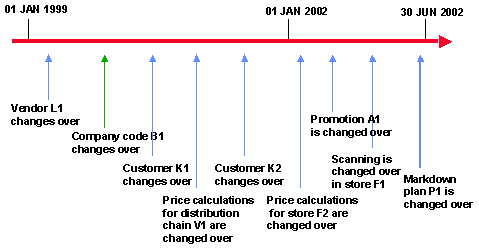
Using the Euro Workbench offers you a high level of integration when dealing with so many changeovers. It enables you to perform changeovers at different times while ensuring that you retain an overview of the whole project. Points to remember about the interplay of the various changeovers are described in the next chapter using detailed examples.
The level of integration in the SAP system becomes particularly clear when you use parallel prices. After a few Customizing changes have been made, this function is available throughout the following areas, for example:
Refer to:
Euro WorkbenchISR – SAP Retail:
 Currency Conversion (Euro)