 Create
Create
Use
You can use the "Create/Change" function to create a material master record for a selected drawing part in the SAP system. When you start the function, the command line asks you to select an info point in the drawing. If the part already references a material master record in the SAP system, the dialog box for changing the material master record in the SAP system will be opened (see also Change).
Menu path:
SAP ® Material ® Create / Change
If the part has no reference, the following dialog box appears:

Description of the dialog box:
The right-hand side of the dialog box contains fields from the master material record in the SAP System. If the fields are assigned to an AutoCAD attribute in the info point, the attribute in question will be displayed directly opposite on the left half-hand side of the dialog box.
The active fields may already contain default values from various sources:
If applicable, the values in the fields of the dialog box can be overwritten in this order. You can change the contents of the active fields before creating the record. To create the material master record in the SAP system, you must at least enter data in all of the required entry fields.

Function |
What the function does |
Cancel |
Cancels the function "Create material master record in the SAP system". No changes are made to the contents of the AutoCAD attribute fields. |
Create |
Starts the function "Create material master record in the SAP system". The contents of the fields in the dialog box are used to create a material master record in the SAP system. If changes have been made in AutoCAD, they will be written to the corresponding attributes of the info point. |
Material numbers can be assigned internally and/or externally (depending on how the SAP system is configured). This will mean either that you have to enter a value in the material number field, or that you can enter a value here if you wish. If the information you enter is not correct, the 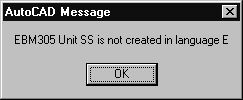 system will inform you of this, and the "Create material record" process will be terminated.
 If this happens, you can correct your entries, and restart the process. If the material master record was created successfully, a message to this effect will be issued. The message will contain the material number of the material master record created.
The part in question now has a reference to the material master record created in the SAP system. This reference is stored in the drawing. If the part in question is a part in the AutoCAD database, the reference is stored there – this means that referencing information is available the next time the part is used. If a part in the AutoCAD database occurs several times in the drawing, the same reference is used for all parts that are the same. If changes have been made to the AutoCAD fields, the changed attributes of the AutoCAD object will take effect in the drawing.
See also:
SAP Material Master Record and AutoCAD Part