
Standby Database Configuration
When the primary (productive) database is duplicated on a standby database, this is referred to as a standby database configuration. The aim of this configuration is to minimize downtime if the primary database suffers an error, since the standby database can assume the role of the productive database in a very short time. The following diagram illustrates the standby database concept:
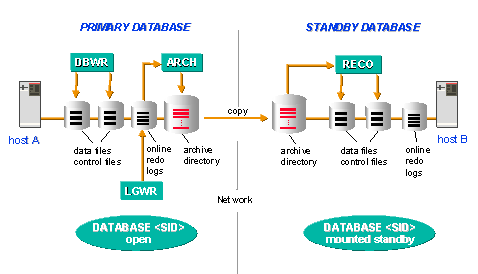
Two identically configured databases operate on two identically configured hosts.
The standby ORACLE instance on the second host is in a mounted standby state (not opened!) and is recovered constantly. This means that the standby instance incorporates all changes to the data of the primary instance either immediately, or with a slight delay. To do this, the offline redo log files created in the primary database system are imported (only the redo entries already archived by ORACLE can be imported). The standby instance therefore ‘follows’ the state of the primary instance.
If it is necessary to recover the primary database system (for example, after a media error), the standby instance can assume the functions of the primary instance in very short time (‘takeover’). The recovery mode of the standby instance is therefore ended, and the standby database opened for online operation.
Since all data files are already located on the standby host, costly reloading of the files is avoided. Some redo entries may still need to be applied to the files to enable all transactions to be incorporated in the standby instance. This means that you must first import the missing offline redo log files from the primary instance. You can then try to archive the current online redo log file of the primary instance with the ORACLE command ALTER SYSTEM ARCHIVE LOG CURRENT and also to import these redo entries in the standby instance. If this command fails, the current online redo log file can be copied to the standby host. It may be possible to directly import the redo entries from the online redo log file.
After the takeover, a standby database needs to be set up again (usually on what was the primary host).

Changes to the physical structure of the primary database (creating new files, renaming files, changes to online redo log and control files) are not automatically incorporated in the standby database in every case. The DBA may need to intervene depending on the type of change.
If it is not possible to incorporate the changes automatically, the recovery process is stopped, and the DBA needs to intervene manually to incorporate the structural change in the standby database. After that, the recovery process needs to be started again.
Renaming of database files in the standby database is not supported by BRBACKUP. The original names of the primary database need to be retained.
If commands are executed in the primary database with the UNRECOVERABLE option, these changes do not appear in the redo log files. It is therefore not possible for the standby instance to receive any information about such changes. In this case, no error messages appear during the recovery process. They are, however, recorded in the standby database ALERT file. You should therefore check the ALERT file regularly.

You will find more detailed information in the ORACLE documentation. The new and/or changed SQL and SVRMGR commands are also described there as well as the necessary init.ora parameters, which are required for working with a standby database.
See also:
Standby Database: Support by BRARCHIVE Standby Database: Backup with BRBACKUP Standby Database Scenario: Advantages and Disadvantages