 Automatic Volume Management
Automatic Volume Management
Purpose
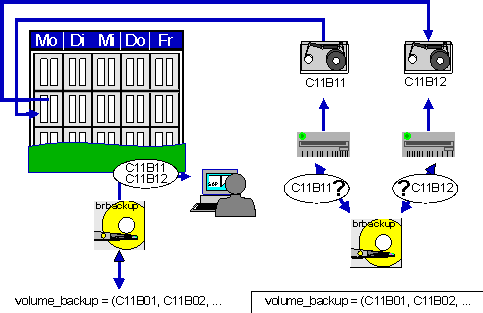
BRBACKUP/BRARCHIVE automatically select the volumes that are recommended for the next backup. The name of the mounted volume is compared to the name found in the volume pool. In addition, the procedure ensures that current backups are not overwritten.
Prerequisites
When you use automatic volume management, do not use weekdays or days of the month in the volume names, because BRBACKUP/BRARCHIVE do not check whether a holiday fell in the period since the last backup or not. SAP recommends that you include the name of the database instance and a sequential number in the tape name, for example
<DBSID>A<nn> for BRARCHIVE tapes, <DBSID>B<nn> for BRBACKUP tapes.Procedure
Activities
The names of the volumes that will be required for the next volume can be displayed as follows:
brbackup/brarchive -q
You can check whether you have mounted the right volume in the backup device:
brbackup/brarchive -q check
Neither call actually starts the backup. In particular, you should use these options before scheduling a backup with CRON or a similar utility.
See
-q|-queryIf you want to select the volumes manually you can deactivate automatic tape management: Set the
init<DBSID>.sap parameters volume_backup and volume_archive to SCRATCH or call BRBACKUP/BRARCHIVE with the option -v SCRATCH .