 BRBACKUP and BRARCHIVE Backups in One Run
BRBACKUP and BRARCHIVE Backups in One Run
You can execute the database backup using BRBACKUP and the backup of the offline redo log files using BRARCHIVE in one run. This option is intended to make more effective use of the increasing capacity of the storage tapes (DLT2000: up to 20 GB, DLT4000: up to 50 GB, DLT7000: up to 100 GB). It also makes an unattended backup easier, since after a backup with BRBACKUP the BRARCHIVE run does not have be restarted as well. As of Release 4.5A, you can use this linkage of the two processes for any backup media, including backups with BACKINT. In the CCMS transaction DB13, you can now make the backup "Database + archive log backup" with BACKINT, or to a disk.
There are two options for making the backup in one run:
We recommend the first option (
brbackup -a ). If the backup is made to tape, BRBACKUP uses the tapes defined in volume_backup and makes the backup in the following steps: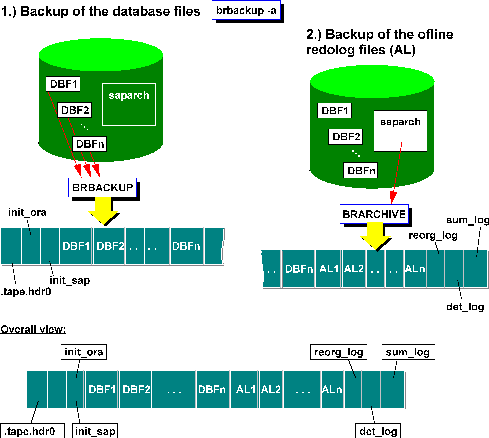

Unattended online backup with two tape devices. The database files are backed up first and then the offline redo log files are copied to the same tapes.
brbackup -m all -t online -c -a -ssd -c
See:
BRBACKUP command mode: brbackup -a|-archiveIf you run the tape administration under control of BRARCHIVE (
brarchive -b ) the tapes defined in volume_archive are used. The only change to the backup is the sequence in which the data files and the offline redo log files are written to tape. In this case the logs are backed up by BRBACKUP at the end. 
Offline backup with one tape device. The offline redo log files are backed up on tape first and then the database files are copied to the same tape.
brarchive -sd -c -b -t offline -c
See:
BRARCHIVE command mode: brarchive -b|-backupMaking a BRBACKUP/BRARCHIVE backup in one run can also be used for a BRBACKUP/BRARCHIVE backup to several tape devices in parallel.
See also:
Parallel Backup
Starting BRBACKUP and BRARCHIVE in sequence with BACKINT, or to disk, only joins BRBACKUP and BRARCHIVE, it does not automatically mean that the backup is made to the same volume. If you are using BACKINT, you can do this with BACKINT tools in some situations.