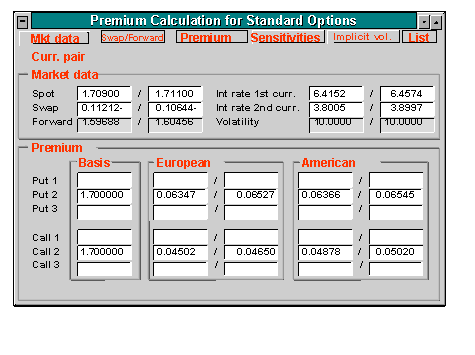
Option Price Calculator
Option Price Calculator
Use
To calculate the value of the
Option premium, you can directly link to the option price calculator during input:You can also use the option price calculator to perform market data calculations for Currency options.
The option price calculator also delivers the important sensitivities of the respective option alongside the premium. The option premium can be used in the entry screens as a percentage rate of the base transaction (in points) or as a fixed amount.
It takes into account the agreed Barriers and Rebates that are paid upon expiration of the option if necessary.
You will find further information in the Market Risk Management (MRM) documentation under
 Option price calculator.
Features
You get to the option price calculator via Trading
® Utilities ® Option price calcualtor or via Extras ® Option price calculator. Alternatively, you can also press the option price calculator button .
.
The option price calculator offers you the following options:
Market data
To perform current market data calculations:
This takes you to the entry screen, Premium Calculation for OTC Options.
-
Currency pair (e.g. USD/DEM)-
Start and end date of option term.3. Press
ENTER . The term and the value date (plus 2 days after the end of the term) will be entered automatically by the SAP R/3 System in the relevant fields.4. By pressing Market data, all fields in the area of the screen headed Market data are filled automatically with current values. Spot rates, interest rates for currency 1 and 2 as well as market volatility.
5. The system uses this data to calculate the swap value.
6. Alternatively, you can enter strike prices for the foreign exchange transaction for 3 Put and Call options.
Swap and forward rate calculation
Calculating premiums
The calculation of the premium is based on: The calculation of the premium is based on: Spot price, strike price, term, interest rates without risk in both currencies, option category and the volatility of the exchange rate.
Sensitivities
After you determine market data and premiums, you can call up a list of the sensitivities of one premium or all premiums.
To view the sensitivities of a premium:
Implicit volatilities
If you want to find out the volatility on which the calculation of a known option premium is based, carry out the following steps:
List
To display the sensitivities of all premiums:
Exotic Options