 Process Quality Notification (QM-QN-NM)
Process Quality Notification (QM-QN-NM)
Purpose
You can use this workflow scenario to support your company's processes for complaints handling. In this scenario, the SAP Business Workflow component helps you process, monitor and complete newly created or activated quality notifications promptly and efficiently. This process is implemented in a workflow template that triggers and controls the execution of the following standard tasks:
SAP Business Workflow
If the appropriate settings have been made for the SAP Business Workflow, the system automatically sends a work item to the persons or departments responsible, advising them that certain tasks need to be performed. This process includes the following tasks and causes:
Task |
Cause |
An outstanding quality notification without tasks needs to be processed |
The person(s) responsible is notified when:
|
A quality notification with outstanding tasks needs to be processed |
The person(s) responsible is notified as soon as tasks are created in the notification and the notification is saved. |
A quality notification with completed tasks needs to be completed |
The person(s) responsible is notified as soon as tasks are created in the notification and the notification is saved. |
Determining the person(s) or departments responsible
For each of the tasks described above, the system notifies the following persons or departments in the order shown:
Prerequisites
All required preparation and Customizing steps have been carried out for the SAP Business Workflow.
Process Flow
The graphic below provides an overview of the workflow process and shows how the various participants interact in the process.
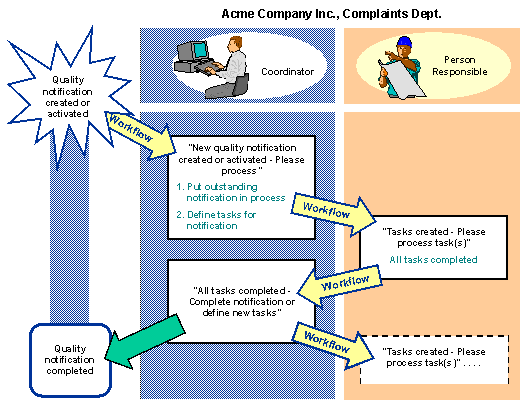
For additional information on the related workflow scenarios, see:
See also:
Flow for Workflow Template WS24500047