Example Correspondence Control (+ Print)
Example Correspondence Control (+ Print)
Here the principle of the correspondence function is explained using the lease-out and lease-out notice as examples.
Starting Point
In you organization, you want to print lease-outs individually or using mass selection as follows:
Residential lease-outs:
Commercial lease-out
Execution
Settings in Customizing of Real Estate
You carry out all activities in Customizing under R/3 Real Estate -> Correspondence
Structures required (example) | |
Residential lease-out |
Commercial lease-out |
Create letter with text modules | |
MV-01:Residential lease-out |
GV-01: Commercial lease-out for contract types 1 and 4 |
ANSCHR-01: Letter to master tenant |
GV-02: Commercial lease-out for contract types 2 and 3 |
ANSCHR-02: Letter to payer |
ANSCHR-03: Letter to master tenant |
For both: KUEND-M-01: Notice by tenant / KUEND-VM-01: Notice by landlord | |
Use the correspondence activity (CA) to specify which addressees (business partners) should receive which letters | |
CA: 6010 Residential lease-out |
CA: 6011 Vertragsart_1_4 / 6012 Vertragsart_2_3 (contract type): |
For both: CA 6530 Notice by landlord / 6531 Notice by tenant | |
Assign the letters to this correspondence activity and the respective addresses for each letter (master tenant / payer) | |
Control of lease-out print + letter: Use correspondence groups (CG) and correspondence applications (CA) to determine which correspondence activities are used during print | |
CG: ApartmentAssign this correspondence group to the object type Lease-out with correspondence application 6010 Residential lease-out ;There are two ways of controlling the print with the correspondence group:
|
CG: Gewerbe_V_1_4 / Gewerbe_V_2_3 (commercial)Assign to object type Lease-out:
Assign the correspondence groups to the required contract types in another Customizing table |
Control of notice letter print You use differentiating characteristics for correspondence applications to determine which correspondence activities are printed | |
Create a function module to determine the differentiating characteristics to be printed (if notice was given by the tenant or the landlord). Assign the function module to object type Lease-out with correspondence application 110 Notice; then assign this correspondence application to the required correspondence activities 6530 and 6531 with correspondence group Apartment .
| |
Activities in the application
There are three ways of printing letters:
The third method is a convenient way of creating contract-specific correspondence. Depending on the Customizing settings (see above), the lease-out letters with their correspondence activities are displayed in list form for selection and print.
For the standard correspondence, all correspondence activities are available for print that are assigned to the respective correspondence application.
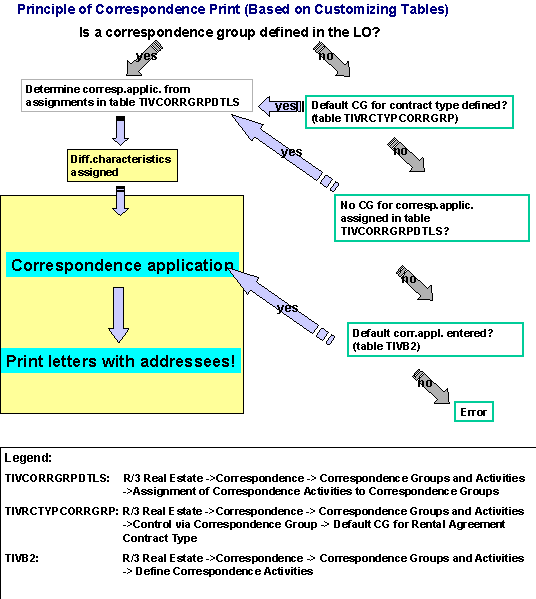
In all cases, print is based on the principle illustrated below.
How does the R/3 System print?
The process is as follows:
When you access the correspondence function, a data retrieval program is called that transfers the data determined by the system for each letter to a special print program.
What do the correspondence programs do? | |
Data retrieval program |
Print program |
Determines
This data is stored in the working memory and transferred to the print program |
The print program controls printing on the output devices. As an alternative, you may optically archive the letter. |
 Object types Rental offer, Lease-out adjustments requiring reminders and Rental collateral are controlled by the differentiating characteristics. However a combination of correspondence application, correspondence activity and differentiating characteristic CANNOT be assigned to a correspondence group.