 Design Environment Property Pages
Design Environment Property Pages
Most OLE control-aware container programs and development environments support a design environment that enables the user to interactively design forms and dialogs. Within this design environment, the user can choose controls from a toolbar window and place on the from.
The SAP Table View control is indicated by  . A typical view on the design environment is shown below.
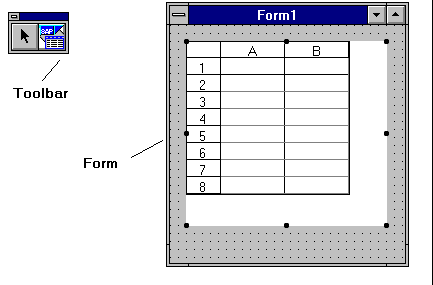
The control’s appearance depends on its configuration, just as the available properties for the control depend on the container. Some containers add additional properties like Visible, Default, Parent or Cancel. These extended properties are described in the container’s manual.
It is also up to the container whether a single property is displayed as in Microsoft Visual Basic, or whether the properties are only available through the property pages at design time. Nevertheless, every control container should support a right mouse button menu on the control with a menu entry properties, which invokes the control’s property pages. The SAP Table View control supports seven property pages:
Table View Property Page: General Table View Property Page: Flags Table View Property Page: Events Table View Property Page: Columns Table View Property Page: Rows Table View Property Page: Fonts Table View Property Page: Colors