Configuring the Tree
Configuring the Tree
The SAP Table Tree control features a dynamic node structure that lets users store any data desired in a
Node object.Node objects can also have any number of properties (called
Items) that characterize the node. These properties constitute the node’s internal structure: all nodes in a control have the same structure. (That is, they all have the same set of properties).The node structure is defined by a series of
structure objects maintained in the Structures collection. Each Structure object corresponds to a single property item: for each item, a property is created in each Node object. The name of the Structure object is the same as the name of the property in each node.Three property items are fixed (pre-defined) for all nodes, and any others are dynamically created. You create a
dynamic node property for the control by adding a Structure object to the Structures collection.The fixed properties are Level, Image, and Name: every tree node has a hierarchy level, a bit image, and a text name. The fixed properties are automatically contained in the Structures collection.
In order to maintain all desired information in a node, you can define some property items as hidden. Hidden items are not displayed: the node is only used as a storage location for the data. Thus it is not necessary to maintain additional tables or arrays to store data associated with a node. This is particularly useful with programming languages like Microsoft Visual Basic where pointers are not part of the language definition.
This configuration also plays an important role if your application uses any drag-and-drop, persistent storage, or clipboard operations. For example, when dragging a node from one control to another, all source control properties having the same Name and
Type as items in the destination control will be transported to the destination control.A similar case applies when the compound stream created by a call to SaveData on a
node is used to insert new nodes into a different control. In this case too, all items with the same Name and Type in the target control are fed by data from the stream.
The following VB 4.0 example illustrates the relationship between the configuration of the
In design mode, SAP Table Tree controls with the name ‘StaffTree’ were placed on a form and five structure items defined as in the following table.
Structures Collection
Item Index |
Item Name |
Item Type |
Hidden |
Alignment | |||
1 |
Level |
trvTreeStructureHierarchy |
FALSE |
Auto | |||
2 |
Image |
trvTreeStructureImage |
FALSE |
Auto | |||
3 |
Name |
trvTreeStructureText |
FALSE |
Auto | |||
4 |
EmployeeID |
trvTreeStructureText |
TRUE |
don’t care | |||
5 |
Department |
trvTreeStructureText |
TRUE |
don’t care | |||
While initializing the control, several nodes are inserted in the control.
Initialization code :
Private Sub Form_Load()
Dim RootFolder As Object
Dim Folder As Object
Dim Leaf As Object
Set RootFolder = StaffTree.Nodes.AddEx(_
,
trv TreeAddFirstSibling,"StaffHierarchy",_"My Company", -1, -1, NodeTypeFolder)
RootFolder.EnsureVisible
Set Folder = StaffTree.Nodes.AddEx(_
RootFolder,
trv TreeAddFirstChild, "Sales", "Sales", _-1, -1,
trv NodeTypeFolder)Set Leaf = Folder.Children.AddEx(_
Folder,
trv TreeAddFirstChild, "", "Peter",_-1, -1,
trv NodeTypeLeaf)' Set an unique key as combination of name and department
Leaf.Key = Leaf.Parent.Key & Leaf.Name
Set Leaf = Folder.Children.AddEx(_
Folder,
trv TreeAddFirstChild, "", "Frank",_-1, -1,
trv NodeTypeLeaf)' Set an unique key as combination of name and department
Leaf.Key = Leaf.Parent.Key & Leaf.Name
Set Leaf = Folder.Children.AddEx(_
Folder,
trv TreeAddFirstChild, "", "Paula", _-1, -1,
trv NodeTypeLeaf)' Set an unique key as combination of name and department
Leaf.Key = Leaf.Parent.Key & Leaf.Name
End Sub
The Department and EmployeeID is supplied within the
Table Tree Event: NodeInsert event handler:Private Sub StaffTree_NodeInsert(ByVal NewNode As Object)
Dim Node As Object
Dim MinID As Integer
Dim NumPos As Integer
Dim ActID As Integer
MinID = 0
If (Not NewNode.Parent Is Nothing) And _
((NewNode.Type And
trv NodeTypeLeaf) = trv NodeTypeLeaf) ThenNewNode.Department = NewNode.Parent.Name
For Each Node In NewNode.Parent.AllChildren
NumPos = InStr(1, Node.EmployeeID, "#")
If NumPos > 0 Then
ActID = Val(Mid$(Node.EmployeeID, NumPos + 1,Len(Node.EmployeeID)))
If ActID > MinID Then
MinID = ActID
End If
End If
Next Node
NewNode.EmployeeID = NewNode.Parent.Name & "#" & (MinID + 1)
End If
End Sub
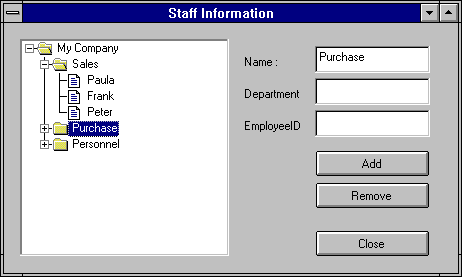
By defining a Structure item ‘EmployeeID’ and ‘Department’, the new
dynamic properties are parts of the node object. Because the Hidden property of these items equals TRUE, the resulting tree is displayed: