Overall Planning for Internal Orders
Overall Planning for Internal Orders
Use
Overall planning is the most important and fundamental form of order planning. This type of planning is independent of cost elements, and you use it to estimate the costs likely to be incurred for an internal order.
The following describes how you can:
Features
Overall planning is always performed in the controlling area currency.
The system updates plan costs and plan quantities (such as actual costs). These costs and quantities remain variable. This applies to primary and secondary cost planning.
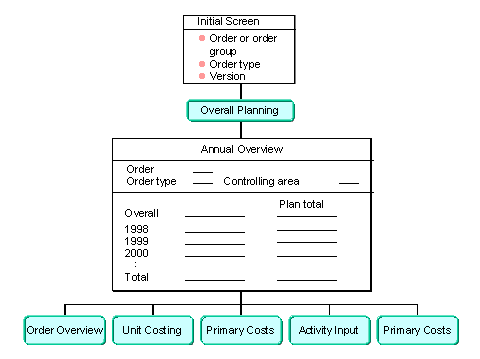
Screen Sequence in Overall Planning
Planning Timeframe
You can plan either overall values or annual values.
When you access overall planning, the system provides the fiscal year you specified as the start year in the planner profile. You can define the planning profile in customizing, by choosing Controlling
® Internal orders ® Planning ® Manual planning ® Define Planning Profile for Overall Planning, then store the planning profile in the order type.
You can enter the following in overall planning:
You can plan the timeframe for past and future dates that you specified in the planner profile. You can use planning for previous annual values to transfer old data from other systems when implementing internal orders.
Views
From
Views, you can choose the values you want displayed in overall planning, (alongside the planned values you enter manually).See also:
Presenting Plan ValuesChecking Your Plan
If you require the system to check whether the cumulated planning value (the plan total of all the years) is greater than the total planning value, choose Planning values
® Check.If an error occurs, the system issues a message referring you to an error log. You can display and print this log by choosing Extras ® Error log.
Further Planning Types
You can also call up the following planning types in overall planning:
Activities
For overall planning, choose Internal orders ®Planning
® Overall values ® Change.To obtain an overview of the overall planning for an internal order or order group, choose Internal orders ® Information system
® Internal order reports ® More reports ® List, then choose the List: Overall plan/Actual/Commitment report.