 Processing Routings
Processing Routings
Use
The routing function allows you to define certain itineraries for which an enterprise-specific airfare rate or discount is to apply.
Integration
During a price query the system will now, together with the relevant Customizing settings, take the rates or discounts for the defined routes into consideration.
Prerequisites
You are in the view Change Negotiated Airfare Rates or Change Discount Agreements for Flights and have entered all required data.
Features
You can use this function to create, display or delete routings.
Components of a routing
A routing is made up of routes. You can define a routing variant by determining several alternative routes for which same negotiated rate or discount applies.
A route is made up of either a direct route (non-stop flight) or several individual succeeding route segments (transit flight). Route segments cover, for example, route sections such as start - stopover, stopover - stopover or stopover - destination.
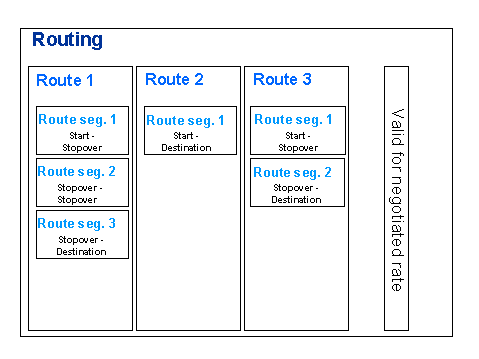
Determinants of a route segment
You can assign these determinants several entries for each route segment. You will find the required data in the collective agreement.
Activities
You can create a new routing or change an existing one using the pushbutton Edit next to the Routing field.
A number is not displayed in the Routing field until you have created a routing using the pushbutton Edit and have assigned this routing the rate or discount.
To access the Overview of Routings directly, for example, in order to delete a routing, use the transaction code TP40.
Example
An enterprise has negotiated a special airfare rate for the Hamburg-Sydney route with Swissair. This rate applies only for the route Hamburg-Zurich-Singapore-Sydney and Hamburg-Geneva-Bangkok-Sydney, not for any other available flight connections.
You can therefore define two possible routes for the special rate routing.
Route |
Route segments |
Provider |
Class |
1 |
Hamburg-Zurich Zurich-Singapore Singapore-Sydney |
Swissair (SR) / Lufthansa (LH) Swissair (SR) Qantas (QF) / Ansett (AN) |
H / B M / H / B Y |
2 |
Hamburg-Geneva Geneva-Bangkok Bangkok-Sydney |
Swissair (SR) / Lufthansa (LH) Swissair (SR) Qantas (QF) |
H / B M / H / B Y / L |
For each route segment you must enter the booking classes laid down in the agreement, start and destination locations and the provider. You can make several entries.
See also:
Creating Routings
Changing Routings