 Templates for Business Processes/Cost Centers
Templates for Business Processes/Cost Centers
Definition
The template is a dynamic tool, which uses
functions , formulas and Boolean logic (true/false) to calculate values. It consists of a grid of columns and rows.Structure
You can choose between six item categories. Depending on the item category you choose, you will have the following columns available for data entry.
Item Type |
Columns that can be edited |
Commentary row |
Description |
Process |
Name, Object, Activation condition, Plan quantity factor variable (only SBP and SCD), Plan quantity fixed, Actual quantity factor variable (only SBP and SCD), Actual quantity fixed |
Sub-Template |
Name, Object, Activation condition |
Cost center / activity type |
Name, Object, Activation condition, Plan quantity factor variable (only SBP and SCD), Plan quantity fixed, Actual quantity factor variable (only SBP and SCD), Actual quantity fixed |
Calculation row (Process) |
Name, Object, Activation condition, Plan quantity factor variable (only SBP and SCD), Plan quantity fixed, Actual quantity factor variable (only SBP and SCD), Actual quantity fixed |
Calculation rows (cost centers/activity types) |
Name, Object, Activation condition, Plan quantity factor variable (only SBP and SCD), Plan quantity fixed, Actual quantity factor variable (only SBP and SCD), Actual quantity fixed |
You have the following entry and maintenance possibility per column type.
Column type |
Possible Entries/Processing |
Item Type |
Commentary row, Process, Sub-template, Cost center/activity type, Calculation row (Process), Cost center/activity types, Calculation row (Cost center/activity type) |
Description |
Explanations |
Object |
Based on the item type, enter the sender object (such as business process). You can enter a fixed object with type process or cost center/activity type, or you can let the system determine this dynamically within an analysis period for one or more processes or cost center/activity types. For more information, see  Object Determination.
 |
Activation Requirements |
Under Activation, determine the conditions, which activate the item. You can enter Active or Inactive as fixed values, or you can define a method, which allows the R/3 System to activate or deactivate the item when the valuation occurs. For more information, see
Activation. |
Plan/Actual quantity factor (only environment SCD and SBP!) |
Factor for variable output quantity. Enter a factor in items process or cost center/activity types. The planned output quantity of the receiver object is multiplied with the factor. The result is the sender output quantity. You can enter a constant value, or you can allow the R/3 System to determine the appropriate value when the valuation occurs. For more information, see Quantity Determination. |
Plan quantity fixed/Actual quantity fixed |
Enter the consumption quantities in items process or cost center/activity types. You can enter a constant value, or you can allow the R/3 System to determine the appropriate value when the valuation event occurs. For more information, see Quantity Determination. |
If you choose item category calculation row, the editor cannot be called up in the object columns.
Example
Template for allocation in business processes (environment SBP).
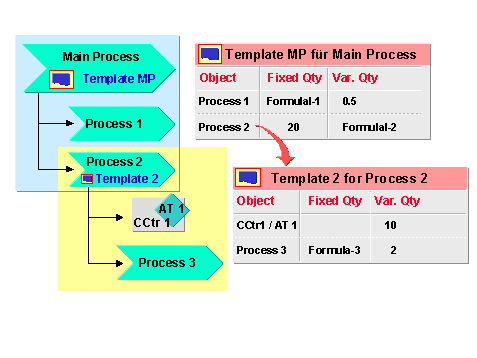
In the above illustration, the resource consumption chain appears with the main process at the very end, Process 3.
Whenever process HP is consumed, processes 1,2 and 3 are also used, as well as the cost center/activity type 1.
The following table clarifies the allocation names:
This process is used... |
...then this object is used.... |
...with a fixed quantity that is calculated with... |
...with a variable quantity that is calculated with... |
...all of which is set in template. |
Process HP (through receiver object) |
process 1 |
formula 1 |
factor 0,5 |
HP |
process 2 |
20 units (fixed entry, no calculation) |
formula 2 |
HP | |
Process 2 (through process HP) |
CCtr 1/Activity type 1 |
_ |
factor 10 |
2 |
process 3 |
formula 3 |
factor 2 |
2 |
See also:
Templates
Executing Template-Allocations