Example: Calculating Product and Component Quantities
Example: Calculating Product and Component Quantities
Scenario
You want to make fruit juice from fruit premix, water, sugar, and lemon juice and fill it in 20-liter containers. Remaining quantities smaller than 20 liters are directed to a collecting tank. For shelf life reasons, you do not want to make a batch split for the fruit premix. Instead, you want to use one tank and thus a complete batch for the production. For this reason, you must match up the product quantity and all other component quantities with the actual fruit premix quantity.
Realization
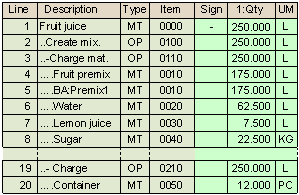
Entries in the Master Recipe and Bill of Material (BOM)
In the BOM, you enter the required component quantities with reference to a base quantity of the material Fruit juice. These quantities are transferred to the Material Quantity Calculation screen in the master recipe. The following data is displayed, for example:

Calculating the Product Quantity
The product quantity in the order is determined by the available fruit premix quantity. For this reason, the system must calculate the fruit juice quantity as follows:
|
Fruit juice qty |
= |
Fruit premix quantity / 0.7 |
You therefore enter the following formula for the fruit juice:
|
[004,001] / 0,7 |
Calculating the Component Quantities
If you want the system to recalculate the component quantities after calculating the fruit juice quantity, you must enter formulas for them. The quantity of water, lemon juice, and sugar can be calculated in proportion to the fruit juice quantity. This means that you must enter the following formulas:
|
[001,001] * 0,25 |
|
[001,001] * 0,03 |
|
[001,001] * 0,09 |
Only whole numbers make sense for the containers. Since you direct remaining quantities into containers, the system must first calculate the number of containers in proportion to the fruit juice quantity and then round it down to whole numbers. The following applies:
|
No. of containers |
= |
Fruit juice qty DIV Maximum qty of container |
This means, you must enter the following formula:
|
[001,001] DIV 20 |
Process During Order Processing
In the order, the material data is processed as follows:
As a result, the following data is displayed:

The following data is displayed: