 Entering a Single Settlement Request and Creating Follow-On Documents
Entering a Single Settlement Request and Creating Follow-On Documents
Purpose
To perform central settlement accounting for agency business, you can enter several incoming invoices for the same vendor as single settlement requests and create follow-on documents for crediting and debiting the vendor and customer accounts. You can calculate commissions on the business transactions.
The following process describes the steps involved in entering a single settlement request and creating follow-on document for payment processing in Agency Business.
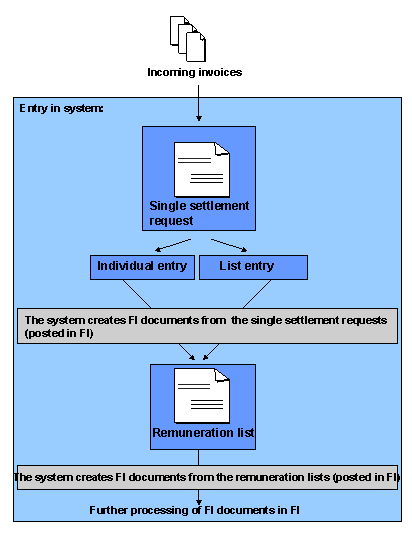
Process Flow
For further information, see
Individual Entry of a Single Settlement Request and List Entry of a Single Settlement Request.For further information, see
For further information, see
For further information, see

If you want to separate the commission from transactions relating to the actual merchandise, you can enter the commission in a vendor billing document and settle it this way.
Results
The documents are transferred to Financial Accounting for further processing (such as a payment run).