 Project Cost Forecast
Project Cost Forecast
Purpose
As a project is executed, variances occur between the original cost and process planning and the actual course of the project. Simply shifting activities within floats is enough to change the pattern of costs in the project. Once the first actual costs have been incurred, you will find it necessary to check and possibly update the figures for the remaining costs. This is the only way to preserve a base for a realistic cost forecast during the whole of a project’s life cycle.
The cost forecast is a process you can use to adapt cost planning to constantly changing circumstances. For the cost to complete, the system determines and values the remaining activities on the basis of the plan, forecast, and actual values in the network. The resulting figure is arrived at by adding the actual and commitment costs already incurred in the project to the updated cost to complete.

The values so determined are default values which act as the basis for your cost forecast.
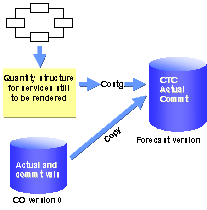
You can carry out the cost forecast at any time for one or more projects. To this end, the system copies the updated costs to complete, along with the actual and commitment values, into a separate forecast version, which you can then evaluate in the information system. If required, you can manage more than one forecast version in parallel. The standard version is CO version 110 for the exclusive use of forecast costs.
Cost forecasts are normally performed as part of periodic processing. If you want to run the cost forecast at a particular time and/or in background processing, you can plan it as a job in the Schedule Manager. Use the Schedule Manager monitor to check the scheduled job both during and after processing.
For more information on the Schedule Manager, refer to
 Individual Functions in the Schedule Manager .
Prerequisites
The system determines cost to complete only for activity-assigned networks which are both appended and apportioned. Preliminary planning networks are not included.
The activity is assigned to a WBS element.
Process Flow
No activity scheduling takes place in the cost forecast. You must reschedule first, so that the calculation of the cost to complete takes account of the changed dates.
You must calculate the overhead on actual and commitment values separately for the calculation of the estimated costs at completion. The system determines the planned overhead for the cost to complete as part of the cost forecast.
It does not consider the following:
The cost to complete cannot be determined for simulation versions.
The values are normally determined as of the first day of the current period, as part of period-end closing. However, you have the option of specifying your own key date for the cost forecast. The system uses the key date to determine the cost distribution.
Residual costs are determined in the same way as planned values are calculated. The basis for the residual cost calculation is the
planned costing variant defined for the activity.If an activity is marked as complete or there is a final confirmation for it, the system sets the cost to complete to zero.
See also:
Residual Costs for Internally Processed Activities Residual Costs for Externally Processed Activities Residual Costs for General Costs Activities Residual Costs for Material ComponentsThe standard system offers forecast version 110. Forecast versions are CO versions which can only be used to handle forecast costs. You can define additional forecast versions in the Project System IMG.
The graphic below shows which values the system updates in the forecast version.
Result
The following forecast version values are available for evaluation in the Project Information System:
You can use hierarchy reports and cost element reports to evaluate the data.
With the standard system, we deliver hierarchy report Forecast 12CTC1 so that you can evaluate forecast values, the cost to complete, and the estimated costs at completion.