 Calculating Work-Center-Based Key Figures (S022, S024)
Calculating Work-Center-Based Key Figures (S022, S024)
The following will describe how to calculate the key figures for the work center- based analyses (operation analysis, work center analysis) in the Shop Floor Information System. These key figures originate from the information structures (S022 (operation) and S024 (work center). The key figures are for the most part arithmetic average values.
With the work center-based analyses, arranging into a period is done according to the confirmation schedule.
Lead Time
The lead time of an operation begins with the input date at the work center and ends with the output date, that is, the completion confirmation date. The input date is determined from the completion confirmation date for the preceding work center minus the minimum wait time for the preceding operation.
Lead Time Deviation
The lead time deviation is the average value of the differences between the target lead time and the actual lead time.
Lead time deviation = Target lead time - Actual lead time deviation
A negative lead time deviation indicates that the actual process took longer than expected, whereas a positive lead time indicates that the actual lead time was shorter than the target lead time.
Execution Time
The execution time is calculated by adding together the setup time, processing time, and teardown time. The result is then divided by the operating time of the work center. This gives the execution time in days.
Queue Time
Queue time is the difference between the lead time and the execution time. Any other times in the lead time that are not classed as execution time are called queue time.
Queue Time Deviation
Queue time deviation is the difference between the target queue time and the actual queue time.
Queue time deviation = Target queue time - Actual queue time
In an operation analysis, you can evaluate other scheduled times:
Schedule Deviation
An analysis of the schedule date deviation for output compares the actual finish date and the scheduled finish date.
An analysis of the schedule date deviation for input compares the actual finish date and scheduled finish date of the preceding work center. Input date deviation is calculated from the schedule deviations for orders received at the work center in the period to analyze.
You must also consider whether an order was received in the period under analysis or beforehand. The key figure "input/output schedule deviation" represents the input schedule deviation of the orders during the period under analysis.
The difference between input/output schedule deviation and input schedule deviation in a period is shown in the following illustration. The upper production order in the illustration is in the period under consideration with the confirmation schedule, but the input schedule is not. If you want to see whether a work center has contributed to the acceleration or slow down of the processing of an order by comparing schedule deviations in output and input, then the exact schedule deviation in output/input must be used even if the input schedule is in the distant past.
Conversely, the schedule deviation in input in the period would then be calculated using the second production order in the illustration. This would occur if no confirmation was yet made, as the question here is about the input schedule. The input schedule is, however, in the noted period.
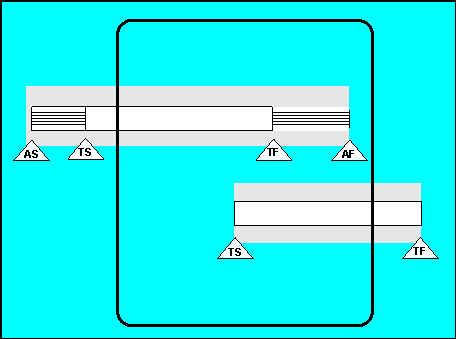
AS = Actual Start, TS = Target Start, AF = Actual Finish, TF = Target Finish
Relative Schedule Deviation
The key figure "Relative schedule deviation" determines whether a work center has processed an order quickly or slowly.
Relative schedule deviation = Deviation from scheduled input date - Schedule deviation "input/output"
A negative result indicates that the work center was slow in processing the order.

The schedule deviation from the scheduled input date of an event amounts to 2 days, i.e. the target input date (scheduled finish date) was exceeded by 2 days. The schedule deviation "input/output" amounts to - 1 day, i.e. the target input date of the previous work center was exceeded by one day.
Relative schedule deviation = - 2 - (-1) = - 1
Quantities and Scrap
The Shop Floor Information System also allows you to calculate average values and average deviations for quantities and scrap.
Capacity Requirements
The key figure "Capacity requirements" is calculated by adding together the capacity requirements for setup, processing, and teardown.
Capacity utilization in % = Capacity requirements
--------------------------------- x 100
Available capacity
The schedule deviation for output of a transaction is -2 days, that is, the target output (schedule finish) was exceeded by 2 days. The schedule deviation input for output is -1 day, that is, the target output of the previous work center was exceeded by one day.
relative schedule deviation = -2 - (-1) = -1