 Linking objects to a document
Linking objects to a document
Use
You can link documents to a great number of SAP objects (for example, materials, customer) in order to document the objects in more detail for various business processes.
Integration
In the standard SAP System, document linking is supported for many SAP objects.
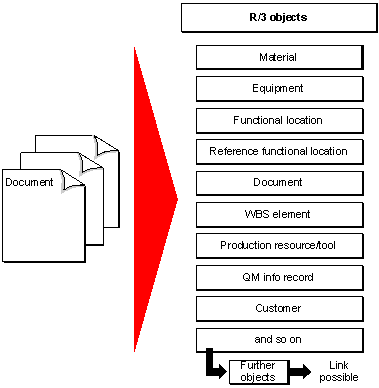
The following graphic shows some of the SAP objects that you can link to a document info record in the standard system.
Prerequisites
In Customizing for the Document Management System, you can define which SAP objects can be linked to documents of each document type by choosing Control Data.
The activity
 Define document type is divided into several work steps where you enter the following data for the object link:
Here you decide whether an object check is made when you set a certain status for your chosen document type. In this case, you can only set the status if there are master records for all the linked objects.

You can link a document with status A to a material for which there is no master record in the system.
If you want to assign status B to the same document, an object check is made for this status. If there is no master record, the status cannot be set, or you must delete the object link.
Here you define settings for object links.
You see a list of all SAP objects that are supported for object links in the standard SAP System by choosing the input help. Additionally, you must enter the screen where the key fields for the object are maintained.
You can decide whether the links for each SAP object are to be copied from the source version when making a new version.
You can activate additional functions in order to link to a third object or to classify the link. Further information can be found using the online help (F1 help) for the indicator Additional functions for object links active.
Features
Linking a document to an SAP object allows you to do the following:
Additional Function for Material Master Record:
In Customizing for Logistics Basic Data: Material Master, you can define a standard document type by choosing Make global settings.
Documents of this standard document type are displayed in the material master record, in the Basic data 2 view (Extras ® Document data).