Display Original Application File with the Viewer
Display Original Application File with the Viewer
Use
You can display original application files with the integrated viewer in the supported processing situations (for example, from the product structure or form the document info record).
See:
Viewer for Displaying Original Application FilesPrerequisites
You have made the setting in Customizing of Document Management for the viewer of the SAP System.
You are in a processing situation that supports viewing the original application file in the integrated viewer.
See:
Viewer for Displaying Original Application FilesProcedure
The following examples show you how to display an original application file in the different processing situations.
In all situation you can display the original application file by clicking on the button  (Display original) or using the context menu (entry Display original).
Displaying Original Application File from the Product Structure
See:
 Display Product Structure
You can see whether a document versions has one or more original application files assigned to it:
(Display original application files)The number of maintained original application files determines later procedures:
Number of Original Application Files |
Procedure |
One |
No further action required. |
Several |
You see a dialog box with a list. The list contains the workstation application or display a short text for the original application file. Select an original application file then choose Continue. |
Displaying Original Application Files from the Document Info Record
On the tab page Document data or Originals all existing original application files are listed.
Result
The system checks the setting in Customizing of Document Management for the current frontend type (such as PC with operating system Microsoft Windows NT). Th system determines which viewer is appropriate for displaying the selected file format (for example *.ACD format for AutoCAD files calls a 2D viewer).
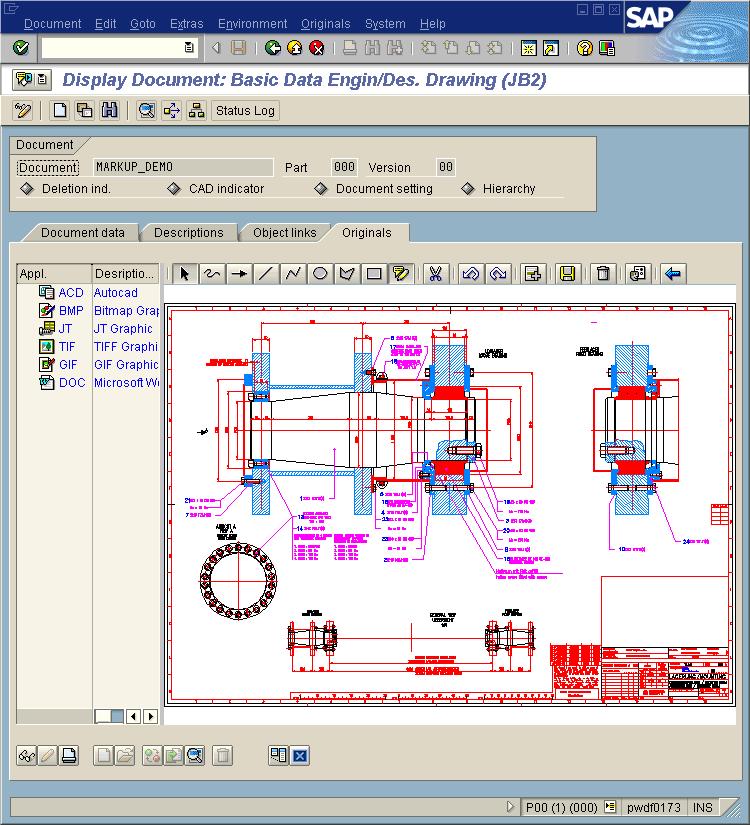
The viewer is started automatically and displays the data of the original application file in a new screen section.
The following example shows the redlining functions in addition to the viewer.