 Processing Loans for Inactive Agreements
Processing Loans for Inactive Agreements
Use
If an employee does not get paid for a certain period of time, repayment of the loan should be inactive for this time.
Prerequisites
 master data maintenance.
Procedure
 .
. or
or  .
.The system refers to the fact that the existing data record is split.
Result
There are now three data records with different start and end dates for the changed loan:
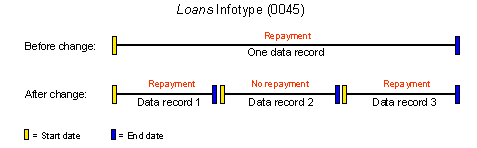
You have changed the employee's loan for a certain period in such a way that no repayments are due. After the end of the period without repayments, the repayment installment originally specified is automatically due.