 Capacity Load Records for the Production Work Center
Capacity Load Records for the Production Work Center
Use
You can configure the system so that the usage of a PP work center by Plant Maintenance can be seen on the planning board for Production.
Prerequisites
For this, the PP work center must be entered in the location data for the technical object. The technical object and work center must be assigned to the same plant.
These are maintained by choosing MaintenanceProcessing and Service Processing ® Maintenance Orders and Service Orders ® General Data ® Create system conditions or operating conditions.
The result is that the system generates capacity requirements records.

You can set the indicator for the system condition in the maintenance item (for planned orders) and in orders entered directly.
Features
The scheduled maintenance work appears as a capacity load for the Production work center on the planning board for Production. The load is fixed and cannot be changed by the production planner.
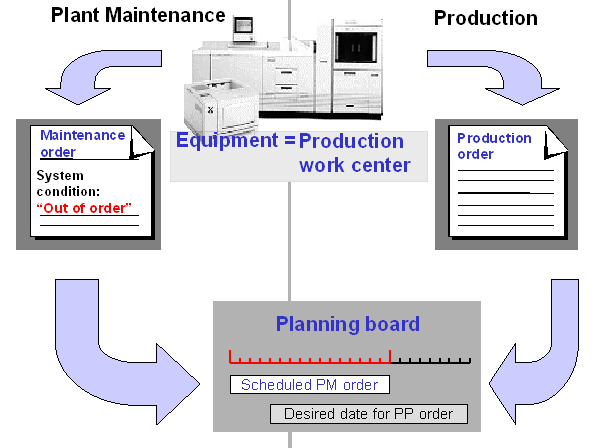
Capacity Load from a Maintenance Order

A production planner wants to schedule a production order for equipment A1234. The order has a duration of five days. On the planning board, the planner sees that preventive maintenance work is being peformed on the equipment during the desired week. This requires the shutdown of the equipment.
The production planner can display the maintenance order for the preventive maintenance work by double clicking in the planning board. Here, it indicates the planner from Plant Maintenance responsible for this order. If the production planner wants the maintenance order to be executed at another time, then they must contact the planner from Plant Maintenance.