 Sales Pricing for Customer Inquiries Assigned to Projects
Sales Pricing for Customer Inquiries Assigned to Projects
Purpose
You have created a project in response to a customer inquiry and now want to use sales pricing to calculate the project price. Where this happens, the plan data from the project forms the basis for calculating the price.
As part of this process, you can:
In the process, you can generate as many sales pricings as you want and save them in documents, without generating a quotation.
For more information, see
For more information, see
Integration
To carry out sales pricing for a customer inquiry assigned to a project, you must have the SD application component.
You link the customer inquiry in SD to the Project System by assigning one or more inquiry items to a WBS element (billing element or account assignment element). The inquiry then supplies the SD data needed for the sales pricing.
When you assign an account assignment element to an inquiry item, the system determines the appropriate billing element within the project. The billing element and the WBS elements subordinate to it (which are not flagged as billing elements) make up the billing structure, together with the activities and inquiries.
This means that, regardless of whether you have assigned the inquiry item to a billing element or account assignment element, the system includes the whole billing structure in the sales pricing.
Prerequisites
Customizing in PS
If you have not assigned a billing element to the inquiry item, the system records the planned revenue in the billing element higher up in the hierarchy.
You must choose an account assignment category that allows project account assignment.
Customizing in SD
To this end, you go to the Account Assignment tab page and enter the WBS element you want to assign to the inquiry item.
The inquiry item then supplies the SD data needed for the sales pricing.
To this end, you go to the Sales B tab page in the inquiry item and enter the profile.
For more information on Project System customizing, go to the Project System IMG and choose Revenues and Earnings ® Integration with SD Documents ® Assign Sales Orders to Project Account.
Additional Prerequisites
Process Flow
For more information, see
Selection Criteria.When you create a sales pricing, the following occurs:
 SD Price Determination.
The system uses the document category from the DIP profile to determine the pricing procedure. Other necessary data for the pricing procedure, such as the sold-to party, is defined in the inquiry.
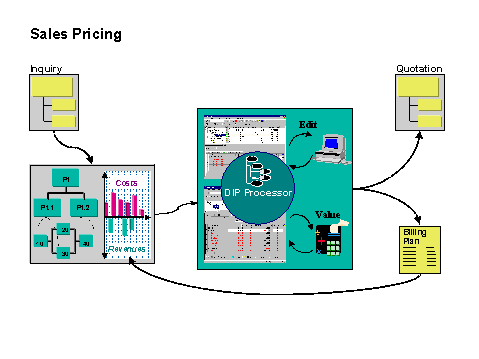
The sales price is entered in the billing plan as the target value. You can distribute this target value to different dates manually.
If the sales price is changed later, the system does not automatically copy the change to the billing plan.
The graphic below illustrates the sales pricing process:
Result
The system saves the sales pricing in a document.
If you have adopted the sales price as the target value in the billing plan, the system records the sales price as planned revenue in the project.
If you have saved a sales price as a document, you can use it to create a quotation in SD.