 Using the Logical Database for Payroll
Using the Logical Database for Payroll
Use
 logical database PNP for HR master data. This tool enables you to create programs for the evaluation of payroll results both simply and quickly.
Using the logical database for payroll results has the following advantages for the user:

Use the logical database for payroll for new reports that evaluate the payroll results.
Scope of Function
The most important functions are:
The
The logical database provides a particular view of the database tables for Personnel Administration (PA-PA) or Payroll (PY) and enables you to select and evaluate payroll results according to particular criteria.

Employees can now be selected on the selection screen of the evaluation report according to organizational criteria, for example, you can select all employees in a payroll area, however, the selection is made using exclusively the payroll results.
The system checks whether the user who started the evaluation has the correct authorization for this evaluation. The authorization concept corresponds to the concept of the previous PNP report.
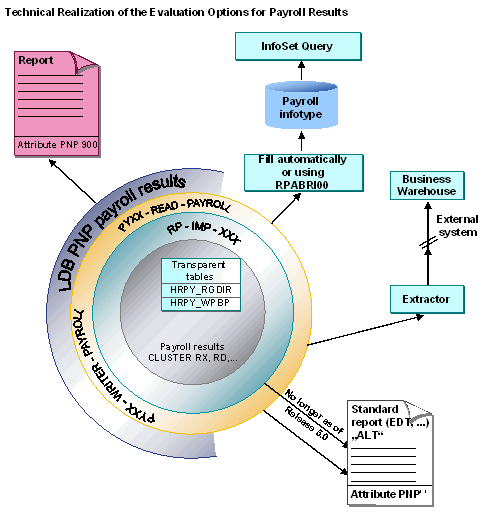
Comparison of the Logical Database for HR Master Data and the Logical Database for Payroll
Technical Criteria or Enhancements |
Logical Database for HR Master Data (PNP) |
Logical Database for Payroll (PNP with Screen 900) |
Time of data retrieval |
There is only one date available for data retrieval:
|
Several data retrieval events exist:
|
Retrieval of payroll data for the evaluation programs |
Each internal table and field string (for example, RT, BT, SV, and so on) must be sorted and processed individually |
A complex structure containing all tables (WPBP, SV, BT, and so on) for each country |
Selection |
|
|
Evaluation report |
|
|
Modifying the selection screen |
In Customizing for Personnel Management under Human Resources Information System ® Reporting using: Report categories (
selection criteria) |
In Customizing (when creating a report) using: Report categories The fields on the selection screen for the evaluation report are controlled using the new report categories. The main procedure for customizing the selection screen corresponds to the familiar procedure for customizing the PNP report categories. |