Entering Measurement and Counter Readings
Entering Measurement and Counter Readings
Use
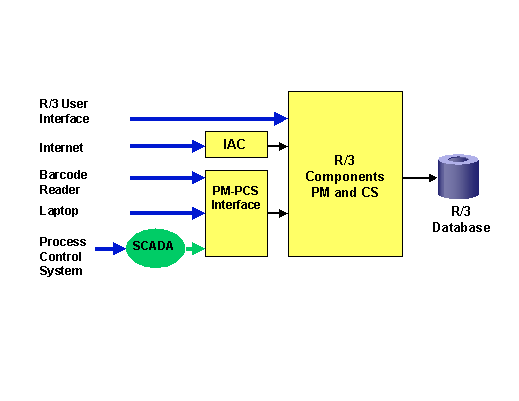
You have five different options for entering measurement and counter readings in the R/3 System.
Overview of all Options for Entering Measurement and Counter Readings
The PM-PCS Interface is an interface between the R/3 System and external systems, such as a Process Control System (PCS). Data from a process control system is data that arises during the monitoring, control, regulation, and optimization of a technical process. You can transfer this data to the R/3 System via the PM-PCS Interface. When transferring data, you can use a SCADA System (Supervisory Control and Data Acquisition System) which filters the data from the process control system and only transfers the data that is actually relevant to the R/3 System.
Features
Option for Entering Measurement and Counter Readings |
Transfer into the R/3 System |
For more information, see: |
R/3 User Interface |
No transfer, because data is created directly in the R/3 System. |
Creating a Measurement Document |
Internet Application Components |
The data is transferred via the Internet into the R/3 System. |
 Entering Measurement and Counter Readings in the Internet
 |
Barcode Reader |
The data is transferred via the PM-PCS Interface into the R/3 System. |
Entering Measurement and Counter Readings As Barcodes
PM-PCS Interface |
Laptop |
The data is transferred via the PM-PCS Interface into the R/3 System. |
PM-PCS Interface |
Process Control System with SCADA system (Supervisory Control And Data Acquisition system) |
The data is transferred via the PM-PCS Interface into the R/3 System. |
PM-PCS Interface |