 Progress Value Determination and Display of Exception Messages
Progress Value Determination and Display of Exception Messages
Use
The difference between the desired and actual progress of an order is shown in the order progress report. The following functions are used for this:
Prerequisites
Progress Value Determination
The following prerequisites must be met if progress values are to be determined for production orders:
The Progress values indicator must be set in the order-type–dependent parameters (Customizing for Shop Floor Control by choosing Master data ®
The progress values are determined by processing the requests. In this case only the last operations that were finally confirmed are taken into account. You can process requests in the following ways:
Displaying Exception Messages
Exceptions do not necessarily lead to exception messages being displayed. For this to happen, the following prerequisites have to be met:
 symbol)
 and
and  symbols)
Features
Displaying Exception Messages
Exception messages warn you that the procurement situation for certain elements can lead to problems (either due to dates or quantities). The variations between planned and actual values that cause exceptions for elements are represented in the report by the following icons:
actual delay too long
expected delay too long
Deficit quantity too large
 Exception exists for the element
 Missing Part
 Elements assigned to an order
Exceptions
The following exceptions are examined in the order progress report:
If the planned finish date of an operation cannot be kept, a yellow traffic light appears.
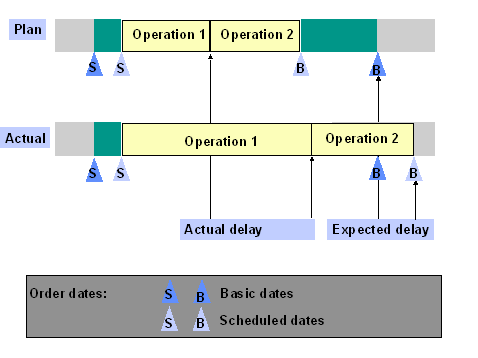
If the basic finish date of an order cannot be kept, a red traffic light appears. If there are floats in an order, a delay in an operation does not necessarily lead to a delay in the basic finish date of the order.
This is illustrated in the graphic below.

The second graphic is an example of an actual delay leading to an expected delay in the order.
To keep track of the order quantity, the difference between the planned yield and the yield of the last operation that has been confirmed is calculated. If this difference, expressed as a percentage of the overall quantity, is larger than the value entered in the overall profile, a bell appears.
If the basic start date of a planned order is in the past, a yellow traffic light appears.
If the basic finish date of a planned order is in the past, a red traffic light appears.
If the release date of a purchase requisition is in the past, a yellow traffic light appears.
If the desired delivery date of a purchase requisition is in the past, a red traffic light appears.
If the latest confirmed date of a delivery schedule is after the desired delivery date, a yellow traffic light appears.
If the desired delivery date is in the past, a red traffic light appears.