 Message Characteristics - Manual Value Assignment
Message Characteristics - Manual Value Assignment
Use
If you want to assign a characteristic value manually in the PI sheet, you mark the characteristic as an input value in the process data request. You also specify how the input value is processed in the PI sheet, that is, whether the system offers a default value or whether an input validation should take place.
In the PI sheet, the system creates an input field or - in repeated data requests - a table column for the input value.

You also define signatures that you use to sign a process step in the PI sheet as input values. For more information, see
Prerequisites
The characteristic you mark as an input value must be contained in the message category that is assigned to the process instruction.
Features
In general, you can define any message characteristic as an input characteristic in a process data request. However, note the following restrictions with respect to repeated process data requests:
Basic Functions
When you define an input value, you must at least enter the following information in the process instruction (see graphic below):
If required, you can also enter a unit of measurement for the input value. The unit of measurement is displayed after the input field or above the corresponding table column in the PI sheet.

To enter this information, you assign the following characteristics to the process instruction in the sequence specified below:
Characteristic |
Meaning |
Value |
PPPI_INPUT_REQUEST |
Input request |
Any short text |
PPPI_REQUESTED_VALUE |
Message characteristic whose value is assigned manually |
Characteristics of the assigned message category |
PPPI_UNIT_OF_MEASURE |
Unit of measurement |
Unit of measurement defined in the system |
A value can be assigned automatically to the characteristics specifying the date (PPPI_EVENT_DATE) and time (PPPI_EVENT_TIME) in the PI sheet. If you define these characteristics as input values, the system proposes the current values as possible entries in the PI sheet. Unlike automatic value assignment, however, you can still change the value.
See also:
Process Data Request / Message Category - ExampleAdditional Functions
You can enter additional information that controls PI sheet processing for each input value in the process instruction (see graphic below). You can define the following:
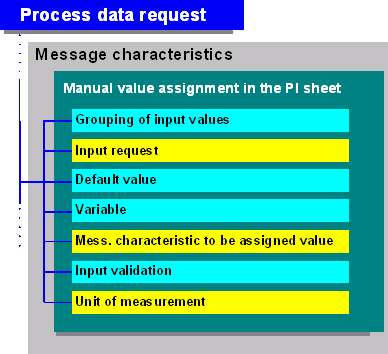
The table below gives an overview of the characteristics you can use to enter this information in the process instruction. The characteristics are listed in the order in which you must assign them to the process instruction.
For more detailed information on the individual functions, see the corresponding sections.
Function |
Characteristic |
Value |
| Grouping of input values |
PPPI_INPUT_GROUP |
Any short text |
Input request |
PPPI_INPUT_REQUEST |
Any short text |
Default value
|
Mess. char. to be assigned a value PPPI_DEFAULT_VARIABLE |
Acc. to char. definition Variable name |
Variable
|
PPPI_VARIABLE PPPI_GLOBAL_VARIABLE |
New variable name, New variable name, |
Message characteristic whose value is assigned manually |
PPPI_REQUESTED_VALUE |
Characteristic of the |
Input validation
Export Parameter value Changing parameters Parameter value Import Parameter value
· Authorization for signature |
PPPI_VALIDATION_FORMULA PPPI_VALIDATION_FUNCTION PPPI_EXPORT_PARAMETER PPPI_<data type>_CONSTANT PPPI_CHANGING_PARAMETER PPPI_<data type>_VARIABLE PPPI_IMPORT_PARAMETER PPPI_<data type>_VARIABLE (<data type> = PPPI_TEXT_FOR_INVALID_ PPPI_ACCEPT_INVALID_INPUT PPPI_SIGNATURE_ |
Boolean formula Function module name Import parameters of the function module Fixed value Changing parameters of the function module Variable name Export parameters of the function module New variable name Long text No Activity for authorization object C_CRPI_BER |
Unit of measurement |
PPPI_UNIT_OF_MEASURE |
Unit of measurement |
See also: