Process Instruction Maintenance
Process Instruction Maintenance
Purpose
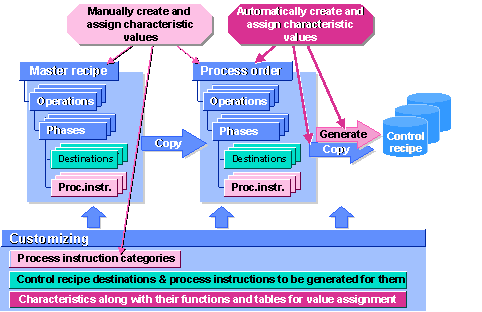
This process describes how you create and maintain process instructions during production planning. In this way, you define the information that is combined in control recipes and sent to process control when you have released the process order.
Prerequisites
The following settings have been made in Customizing for Process Management:

In Customizing, you define the following for a data request:
Process Flow
When creating process instructions, you refer to a process instruction category. The process instruction automatically obtain the same type as the process instruction category to which it refers. All other data, that is, characteristics and characteristic values, is copied to the process instruction and can still be changed.
In a data request, you add:
– The values of those message characteristics that are not assigned automatically in the process order or PI sheet known to you
– The text for the input request and, if you use them, input validations
If you do not want to use all message characteristics, you delete the ones you do not need.
When copying the recipe data, the system also copies the process instructions to the process order. If required, you can add more process instructions in the order.
In a data request that you use to report a measurement reading, you enter the name of the measuring device connected to the resource you have selected.
By now, a value must have been assigned to all process instruction characteristics whose value is not assigned automatically when the control recipe is created.
If you want, you can start characteristic value assignment in the order to check and, if necessary, change the values assigned automatically.
Characteristics whose values depend on the scope of generation have their values assigned directly.
If you specify that a process instruction containing the most important material data is generated for each reservation item, the characteristic value for the reservation item is assigned automatically.
Maintenance of Process Instruction Categories - Overview