 Creating Relationships in the Operation Graphic
Creating Relationships in the Operation Graphic
Prerequisites
The phases of the master recipe have been created in the system (see
Editing Operations/Phases or Creating Operations/Phases in the Graphic Mode).
The operation graphic only shows several recipes if they have been linked by relationships. In most cases, you therefore create relationships across recipes on the relationship overview of the corresponding phase (
Procedure
 on the operation overview.
Depending on the settings made in the graphic profile, the graphic comprises the Display, Navigation, and/or Entry sections. To carry out the steps described below, you need the display area. If necessary, change the graphic layout (see
 in the graphic.
Note that you must either click the left or the right side of the phase symbol depending on the type of relationship you want to create (see graphic).
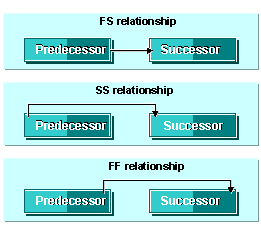

An arrow is used to display the relationships you have created either as time-dependent or as FS relationship. If necessary, change the graphic layout (see
The function for creating relationships is switched off.
The relationship detail screen appears.