 Conversion of Evaluation Reports
Conversion of Evaluation Reports
How Do You Convert an Existing Evaluation Report to the Logical Database for Payroll?
In Release 4.6C, we recommend that you first convert any reports (standard reports and customer reports) that are not used by any other report. You should not convert reports that are called using function modules or other reports (for example, the remuneration statement or the payroll account) in this release.

See the release note Using the Logical Database for Payroll for Release 4.6C.
To convert a report to the logical database for payroll, proceed as follows:
Select Payroll report category.
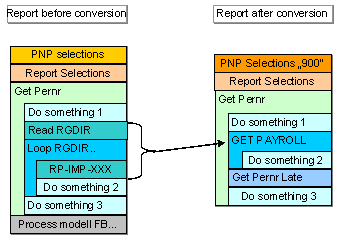

SAP provides the report EXAMPLE_PNP_GET_PAYROLL as an example.
To convert old evaluation reports, use the utility macros, which are contained in the standard system, and one of the listed variants.
Switch macro RP-IMP-C2-xx to the event GET PAYROLL.
See also:
Example 1: ABAP Coding: Read International Payroll Results Example 2: ABAP Coding: Read National Payroll Results Example 3: Utility Macros for Report Conversion Example 4: Old Coding Example 5: Variant A – New Coding Example 6: Variant B – New Coding Example 7: Report EXAMPLE_PNP_GET_PAYROLL for Evaluation of Payroll Results