 Order Release
Order Release
Use
When you have finished planning with all the necessary specifications, you can
release the order. Only then can the employees on site start the activities described.You also have the option of releasing orders immediately when they are created. This option is available for orders created automatically by the system, that is, for orders which are created:
Integration
Release of the Order Within Maintenance Processing
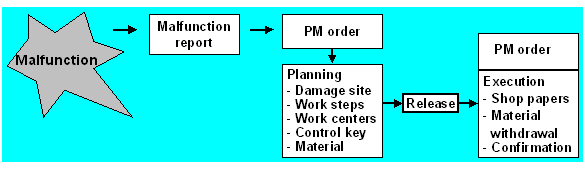
You can only perform the following activities after you have released the order:
Since in many companies the work steps Release and Print shop papers follow directly after one another, you can also initiate these two steps using a single system function. See Putting an Order in Process.

In many cases, the execution of the maintenance work also includes the technical completion confirmation. However, the order does not have to be released before the confirmation can be entered.
Prerequisites
To release these orders immediately when they are created, the system administration must set the indicator Release immediately for the required order types, using the Customizing function.
Features
When you release an order, it has the status REL. This status is a prerequisite for executing the dependent functions outlined above.
When you release an order, the system checks the availability of materials and production resources/tools and the necessary permits. At the latest when the order is released, the material reservations are relevant for materials planning and can be withdrawn, and the purchase requisitions generated.
The following also applies for refurbishment orders:
After release, you can no longer change the following entries in the refurbishment order: