 Connecting the Converter
Connecting the Converter
Use
There are several ways to connect a converter to the SAP System. You must consider the conversion results when selecting one. For example if you want to convert original application files from documents you must set up the conversion server differently than when you want to convert assemblies.
There are three ways to connect a converter to the SAP System.
Method |
Objects you want to convert |
Transfer of parameters |
1 |
Individual original application files from documents |
Parameters are transferred between the SAP System and the converter using files |
2 |
Individual original application files eof documents and assemblies | |
3 |
Individual original application files eof documents and assemblies |
Parameters are transferred between the SAP System and the converter using an RFC interface |
You can convert individual original application files of documents using the converter connected with this method. You can use the compiled example server ConvServSamp. No previous programming knowledge is required. It is however necessary to modify the
shell-script and possibly a batch file.You can find examples on the SAP server SapservX in the directory ~ftp/general/misc/converter/.
Th graphic display how the example convert All2txt is connected to the SAP System using the first method. All2txt converts files into text files. A shell-script file (such as ConvServ) starts ConvServSamp. This method uses the following conversion steps:
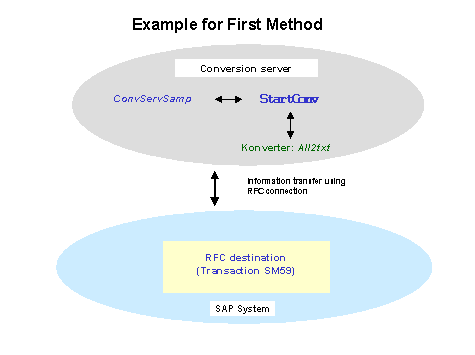
Below are tips and notes for the individual steps
Step |
Note |
Call ConvServSamp |
You must enter the following parameters when calling ConvServSamp:
More information about the document you are converting can be saved as an extra file by using the parameter -ReadDocumentDetails .Examples:
|
ConvServSamp creates <WorkingDirectory>/Parameters.txt |
The file <WorkingDirectory>/Parameters.txt is created before calling StartConv and contains the parameters that were maintained in Customizing of the conversion specification. In Customizing of Conversion you make the settings Logistics General® Conversion ® Determine conversion. Additional Files The following files are also created when ConvServSamp is called using the parameter -ReadDocumentDetails:
The files contain the data that the function module CAD_GET_TITLE_BLOCK_DATA determines. You can find information about the content of these files in the documentation for this function module (Export Parameter DOCUMENTDATA and ECMDATA and tables DOCUMENTDESCRIPTIONS, LONGTEXTS, CLASS_DATA, OBJECTLINKS, STATUSLOG, EXPORT_DATA and USER_DATA ).
<Name> = <Value> (example: DOCUMENTTYPE = DRW) No limits are used. |
ConvServSamp sets parameter values for StartConv |
The example server ConvServSamp calls the file StartConv: StartConv <Version> <WorkingDirectory> <FileToConvert> <language> <ConverterTimeOut> <conversionName> <DocumentKey> <current_user_name> <sy_language>
This keeps the Shell from interpreting the special character.
Parameter meanings:
Directory used for converted files Files you want to convert Language for possible dialog boxes ('X' means no language selected) Cancel conversion after this many minutes. Name for conversion Key for the document in the following sequence: 3 characters: documenttype 25 characters: documentnumber 3 characters: documentpart 2 characters: documentversion
Name of user who started the conversion implicit or explicit Language used by <current_user_name> |
Modifying StartConv |
Change the example file StartConv so that
After StartConv is completed ConvServSamp runs through the following steps:
This file is automatically transferred to the SAP System and stored as a new original application file. |
2. Method
You can convert individual original application files of documents and assemblies using the converter connected with this method.
You can use the compiled example server ConvServSamp. No previous programming knowledge is required. It is however necessary to modify the
shell-script and possibly a batch file.The procedure is very much the same as the previous method.
The following overview shows information about files and parameters that are processed for converting assemblies only.
Activity |
Note |
ConvServSamp creates <WorkingDirectory>/ ConvStructFilename.txt |
Before calling StartConv the <WorkingDirectory>/ConvStructFilename.txt is created by ConvServSamp. Each line of this file contains the following parameters:
The format is fixed. There is no separator between the entries. |
Converter creates <WorkingDirectory> |
The converter creates <WorkingDirectory>/ConvPathAndMatrix.txt instead of the file <WorkingDirectory>/ConvPath.txt. Each line of this file contains the following parameters:
The format for these three parameters. There is no separator between the entries. In case the path name is not yet at its end, it must contain 12 real number between these there must be an empty space: The transformation matrix is used to describe the relative position of the part to the father. When more than on instance exists then each instance must have its own line. These lines must be identical except for the transformation matrix. |
3. Method
You can change the example server ConvServSamp when you do not wan to transfer your conversion parameters as files or when the first two methods do not meet your needs. You need to have programming knowledge of (C source code).
You will find the C source code for the RFC Server ConvServSamp on the SAP Server SapservX in the following directory: ~ftp/general/misc/converter/source.SAR
The converter is called from the SAP System as follows:
CALL FUNCTION 'ASSEMBLIE_CONVERTER'
DESTINATION wa_converter_dests-conv_dest
EXPORTING interface_version = interface_version
output_directory = output_directory
language = isola
sy_language = sy_isola
timeout_minutes = timeout_minutes
conversion_name = wa_conv_requested-handle
document_key = document_key
current_user_name = sy-uname
IMPORTING error_message = error_message
return = bapireturn
TABLES ti_conv_struct_filename = t_conv_struct_filename
ti_parameters = te_parameters
te_conv_path_and_matrix = ti_conv_path_and_matrix
Information about the type and structure of the fields are in the file ConvServ.h.
Below is information about the use of individual fields.
Entries for the Converter
Entry |
Use |
interface_version |
Indicates which functions are supported by the current SAP version |
output_directory |
Working directory where the converted files are sent |
language |
Language for the error messages in the SAP System |
sy_language |
Language used by the user to logon to the SAP System before starting the conversion. |
timeout_minutes |
Time in minutes after which the conversion is cancelled as not successful |
conversion_name |
Name for identifying the conversion |
document_key |
Key of the document that you want to convert |
current_user_name |
User who started the conversion |
ti_conv_struct_filename (table) |
Structure and path names |
ti_parameters (table) |
See: Section Converting Original Application Files of a Document, <WorkingDirectory>/Parameters.txt |
Output of the Converter
Output |
Use |
te_conv_path_and_matrix |
Here you can transfer the converted file and the transformation matrix and/or an error message (in 2 table lines) for the file you entered.
|
error_message |
Error Messages:
If all fields (except msg_type and msg_txt) are released, an long message can be entered in the msg_txt that has up to 200 characters. |
return |
Error messages can also be added to this structure |
The RFC server must also contain the function CONV_SERV_ABOUT that you can use without changing the example ConvServSamp.c.