 Services
Services
 Dienstleistung (MM-SRV)
Definition
You can also plan services which are to be performed by an another company using externally processed activities and external elements. These activities are the link to the SAP application MM Services (MM-SRV). This application supports the entire cycle in contracting services: from proposals and awarding contracts to the acceptance of services.
Using the data you have entered for the service, the system automatically creates a purchase requisition in which all services for an externally processed activity are summarized into the sub-items.
There are two ways to enter a service in the system:
With planned services, you can refer to services that have been entered as a service master. You can however just enter a text and an amount for services.
The service master is a source of default data. You can reference it for services you want for your external activity.
Unplanned services are those tasks which cannot or should not be specified because it is still unclear what exactly the task involves, for example, the translation of technical drawings which do not yet exist.
For unplanned services you can only enter a description and an amount. You can set a value limit for the amount that should not be exceeded. In addition, you can reference existing contracts in Purchasing.
After the services have been performed, you can record them on service entry sheets and then accept them. Accepted entry sheets form the basis of invoice verification for services.
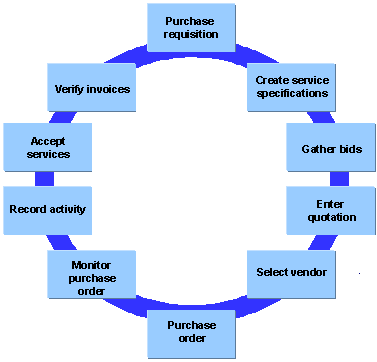
In the following graphic you can see the individual steps involved in the procurement cycle from the solicitation of bids for specific services to invoice verification.
See also:
MM - Services
When are Purchase Requisitions Created?
You can create purchase requisitions:
You can use this function if, for example, your project is still in the proposal stage and you do not want any purchase requisitions to be created yet.
On the external processing detail screen, you can:
Changes to Quantities and Dates
If quantities and dates in the activity change, the purchase requisition is automatically corrected, if it has not yet been converted into a purchase order. Depending on the release procedure in Purchasing, quantities and changes will be corrected automatically.
If quantities and dates in the activity change and the purchase order has already been created, a workflow is started. The purchasing agent receives a message in the mail system regarding the changes that need to be made. This person can then make the necessary changes to the purchase order directly from the mail system.
Costs of Services
The system determines the costs of the service from the price you have entered for the service. With the cost element in the activity, you can determine how the activity should be valuated.

Pricing using conditions is possible in the network.