
Hierarchy Processing Examples
Example 1
You have a customer project. Automatic derivation means that the balances are formed and the update made in the billing element. You manage overhead costs which are not billed to the customer in WBS element P4 (see diagram below). You set the indicator Do not calculate interest so that P4 is not included in the interest calculation. This means that the interest calculation only covers P2, P3, and the assigned order.
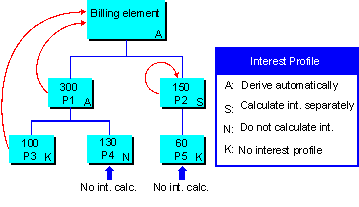
The costs in P4 and P5 have no effect on the balance in the billing element. Only the costs in P1 and P3 have any effect.
Object |
Hierarchy Processing |
Interest Calculation |
Actual Costs |
Balance |
F1 |
Automatic |
Yes |
400 | |
P1 |
Automatic |
Yes |
300 |
|
P2 |
Separate |
Yes |
150 |
150 |
P3 |
No interest profile |
Yes |
100 |
|
P4 |
Do not calculate interest |
No |
130 |
|
P5 |
No interest profile |
No |
60 |
Example 2
You have a cost project, meaning that interest is posted per account assignment object. The graphic below shows how the logic for WBS element hierarchy processing was maintained.

This results in an interest calculation as follows:
Object |
Hierarchy Processing |
Interest Calculation |
Actual Costs |
Balance |
P1 |
Automatic |
Yes |
300 |
300 |
P2 |
Separate |
Yes |
150 |
150 |
P3 |
Automatic |
Yes |
100 |
100 |
P4 |
Do not calculate interest |
No |
130 |
|
P5 |
No interest profile |
No |
60 |
|
A1 |
No interest profile |
Yes |
60 |
60 |
P5 has no interest profile of its own and does not inherit the interest profile from the higher level WBS element, P2. This means that the interest calculation ignores P5.
Similarly, order A1 does not contain an interest profile, but it does inherit the interest profile from the higher-level WBS element (P2). This means that the interest calculation takes account of order A1.