 Requesting an Adjustment Posting from the Intranet (AC)
Requesting an Adjustment Posting from the Intranet (AC)
Purpose
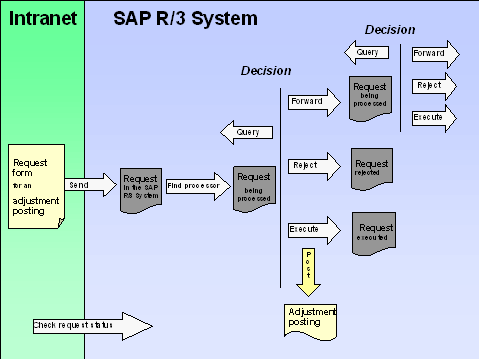
You can request an adjustment posting from the Intranet. You do not have to know the name of the processor, since the system automatically determines it. The request is transferred to the SAP R/3 System and can be processed there with the functions of the message processing.
You can call up the request form
 Workplace launchpad
line item reports in Controlling (CO)
G/L accounts
document display in Controlling (CO)
document display in Financial Accounting (FI)
Workplace launchpad
line item reports in Controlling (CO)
G/L accounts
document display in Controlling (CO)
document display in Financial Accounting (FI)
You can call up the reports and the document display from the workplace as well as in the SAP R/3 System.
Prerequisites
To do so, in Customizing choose Cross-Application Components ® Internet/Intranet Services ® Internal Service Request ® Definition of Scenarios with Specific Customizing ® Request for an Adjustment Posting ®
Define Own Scenarios For The Request For An Adjustment Posting.
To do so, in Customizing choose Cross-Application Components ® Internet/Intranet Services ® Internal Service Request ® Definition of Scenarios with Specific Customizing ® Request for an Adjustment Posting ®
Assign Own Scenarios For The Request For An Adjustment Posting.
To do so, choose Cross-Application Components ® Internet/Intranet Services ® Internal Service Request ® Definition of Scenarios with Specific Customizing ® Request for an Adjustment Posting ®
Assign Adjustment Postings To The Scenarios.
Process Flow
The system transfers the data of the incorrect posting.

In the cost center line item report, you notice that an amount was incorrectly entered. However, you do not know the name of the processor. From the line item report, you access the request form for an adjustment posting by choosing Extras ® Correction request.
When you send the request, the information is transferred to the SAP R/3 System. The system determines the responsible processor based on entries made in Customizing (see
Define Own Scenarios For Requesting an Adjustment Posting). In the second decision level, the options a to d are available again.
In the last three cases, the processor can enter a text to explain the reason for his/her decision.

You can check the current state of the request at any time (see
Request for an Adjustment Posting
Result
The adjustment posting is either completed or the request is rejected.
For more information, see the SAP Library under Cross-Application Components ®
Internal Service Request.