Maintaining the Distribution Model 

Use

The distribution model describes the ALE message flow between logical systems. The relationships between logical systems, message types, BAPIs (Business Application Program Interfaces) and filters are defined in the distribution model. Both applications and the ALE layer use the distribution model to determine receivers and to control the data distribution.

Prerequisites

The logical source system (R/3 System) and the logical target system (external CSD system) from and to which the IDocs are sent, must be specified in the Implementation Guide (IMG) for each outbound IDoc.

Procedure

  1. To call up the IMG from the initial R/3 screen, choose Tools ® AcceleratedSAP ® Customizing ® Project Management. The screen Customizing: Project Administration is displayed. Choose the pushbutton SAP Reference IMG.
  2. In the IMG hierarchy, choose Basis Components ® Distribution (ALE) ® Modelling and Implementing Business Processes ® Maintain Distribution Model.
  3. In the screen Display Distribution Model, choose Distribution Model ® Switch processing mode.
  4. In the screen Change Distribution Model Choose Edit ® Model view ® Create, to create a new view in the distribution model.
  5. Enter a short text description and a technical name for the model view and choose Continue.
  6. Position your cursor on the model view that you have created and choose Edit ® Add message type.
  7. In the dialog box Add Message Type, specify the sender/client (logical source system) and the receiver (logical target system) for each required message type.
  8. Save your entries.

Result

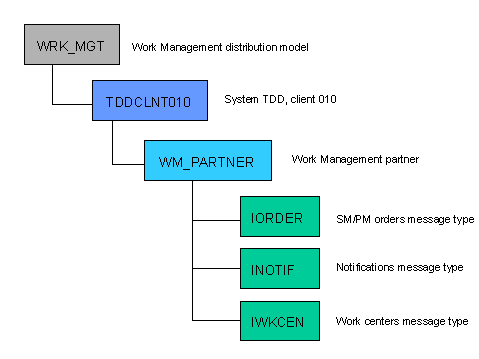
In the following example, TDDCLNT010 is the logical for the R/3 current system and WM_PARTNER is the logical system for the CSD external system.