 Reversing the Payroll Result
Reversing the Payroll Result
Prerequisites
You have corrected the relevant master data.

If you reverse a payroll result that was the result of bonus accounting, you must also delete the relevant infotype record in the One-Time Payments Off-Cycle infotype (0267).
You are in the
Off-Cycle Workbench.Procedure
 Reverse.
Result
Depending on whether you have reversed the last payroll result, whether the payroll result was already posted to Accounting, and whether payments were already made to third parties, the system triggers various subsequent activities:
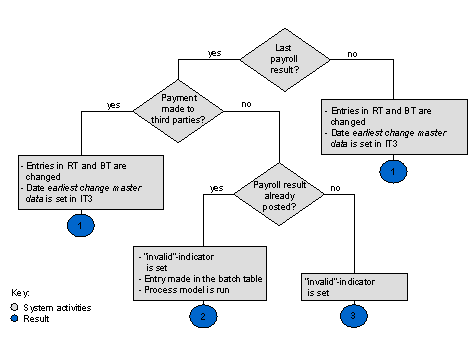
Result 1
Out-of-sequence reversal
This ensures that retroactive accounting takes place.
Result 2
"Void"

If the V indicator is set, the payroll result can no longer be used for evaluations. Instead, it is only available for the payroll history. The system enters the reason, the date, and the time of the reversal to the data record.
You can display the contents of the indicator table using report H99LT52OCG (Display Indicator Table for Off-Cycle Batch Processing). The report is located in the Off-Cycle menu.
The report reads the indicator table and runs the process model that you specified in the report variant. The process model produces reversal documents for reversed payroll results and posts them to Accounting. As a result, the documents that were originally posted are reversed.
Result 3
"Void"
The system places the "void" indicator V in the invalid field of the payroll directory (RGDIR) for the payroll result.