Displaying a Standard Network
Displaying a Standard Network
Use
The standard networks provide you with templates for internal and external activity or services and for operating resources that you require for activities. These networks form the base for planning, control and monitoring of dates, costs and resources in project execution.
You can find further information in the SAP Library under
Logistics
® PS Project System ® Structures ® Standard Structures ® Standard Network.The planned process flow for the construction of a power plant is displayed in 15 standard networks. These networks form the template for the operative networks created with the project.
See also:
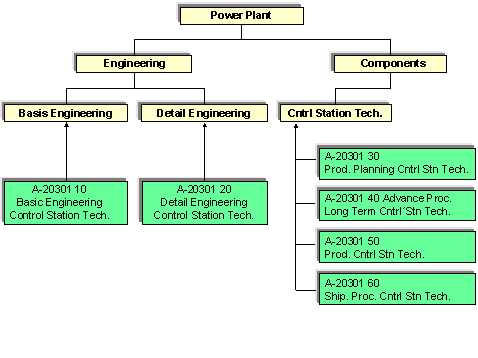
Logistics Master DataThe activities in the standard networks are linked to the standard WBS elements.
Planning using activities and assignments to WBS elements has important advantages:
For example, the network activities for control station technology are assigned to the following standard WBS elements:
Procedure
Menu Path |
Choose Standard network ® Display |
Transaction Code |
CN03 |
Field |
Data |
Standard Network |
A-20301 (internal processing) A-20307 (external processing) |
 Activities.
 You see an overview of the activities.
You can see the assignment of activities to standard WBS elements on the Total tab page.
 .
. The Relationship Overview screen appears.
 .
. .
. An overview screen displaying the network structure appears.
. .
. The detail screen for this activity appears.