 Displaying a Standard WBS
Displaying a Standard WBS
Use
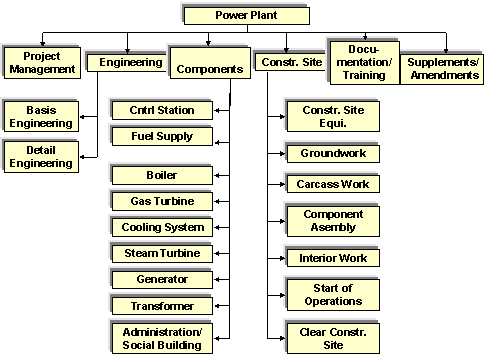
You have reflected your experience in standard structures so that large projects can be processed quickly and in a standard way. Project activities to be performed are displayed in the form of a hierarchy in the work breakdown structure.
You can find further information in the SAP Library under
Logistics
® PS Project System ® Structures ® Standard Structures ® Standard Work Breakdown Structure (Standard WBS).The standard WBS A-20000 for the construction of a power plant has the following structure:
Procedure
Menu Path |
Logistics ® Project System ® Basic data ® Templates ® Standard WBS ® Display |
Transaction Code |
CJ93 |
Field |
Data |
Standard project definition |
A-20000 |
 .
. Here you can see information on the default organizational data and status profiles.
Here you can see information on the default profiles for the project, accounting and scheduling.
 .
.  .
. The Hierarchy Graphic screen appears.