Deploying and Running Your Application
Prerequisites
You have made sure that the SAP Web Applications Server Java has been launched.
You have checked that the application server is correctly selected in the Developer Studio. To check the server settings, choose the menu path
 Window
  Preferences SAP AS Java.

Procedure
If you have not already done so, save the data for your Welcome project in their current state.
In the Web Dynpro Explorer, open the context menu for the application object WelcomeApp.and choose Deploy new Archive and Run.
Depending on the server settings, you will be asked to enter username and password to access the server.
Result
The Developer Studio launches the Web browser and chooses the default view WelcomeCompView.
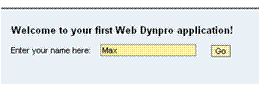
Enter a name and click the Go button. Now you are directed to the ResultView and the name you have entered is displayed in the TextView.