Creating a Web Dynpro Development Component (DC)
To manage local development objects, you need a specific DC project in the Developer Studio. A Web Dynpro DC serves as a container for Web Dynpro-specific resources and development objects such as Web Dynpro components, models, component interfaces, views, local dictionary data types, mimes. For this reason, you will use the appropriate wizard to generate a suitable project structure for the new Web Dynpro application.
Prerequisites
You have launched the SAP NetWeaver Developer Studio.
Procedure
To open the Web Dynpro perspective, choose
 Window
  Open Perspective Web Dynpro
  .
.Choose
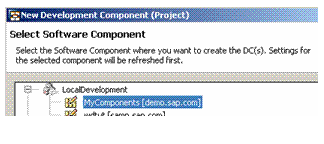
File New Web Dynpro Development Component . The New Development Component wizard appears.Choose a Software Component for your Development Component, for example MyComponents, and confirm with Next.
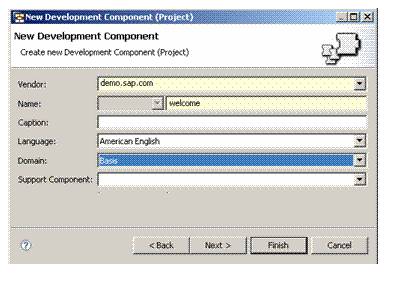
In the window that appears, give your DC the name welcome, leave the default settings unchanged and choose Finish.
Result
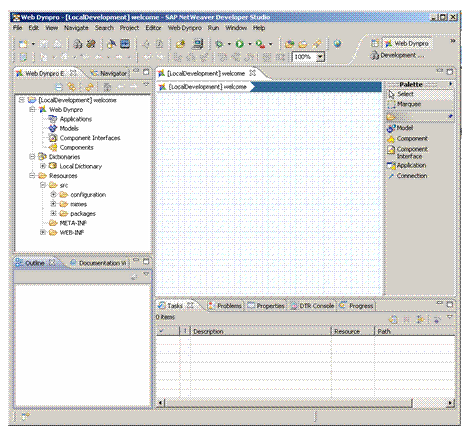
The wizard generates an initial structure for your new Web Dynpro DC as shown below. The Web Dynpro Explorer provides a logical view of the structure of a Web Dynpro DC (as opposed to a pure file and folder-based one). With this project view, you can access all Web Dynpro units. In addition, each Web Dynpro DC provides access to local dictionaries, with the help of which you can create user-defined dictionary types. Additionally required projects resources, such as MIMEs or even separate Java help classes, can be added to the Web Dynpro DC through the resources node.