 Mapping the Generic Event Parameter nodeElement
The nodeElement parameter references the corresponding node element in the context to which the UI element is assigned. For example, when you use a button as TableCellEditor in a table, this parameter can be used to determine which table row the button was pressed in without having to analyze the lead selection.
Procedure
Adding a parameter to the action
In the ViewDesigner, switch to the Action view, select the corresponding action and select New beneath the Parameter table.
Assure that the checkbox for Adapt event handler parameter is checked.
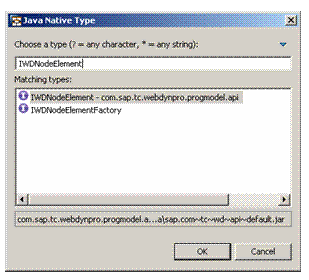
Select Java Native Type and enter IWDNodeElement in the input field type, as shown in the screenshot below:
Mapping the parameters
Switch to the Layout view, select the UI element in the Outline, and select Parameter Mapping in the context menu.
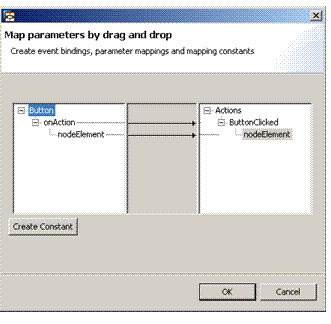
Select the action’s nodeElement parameter and drag and drop it to the event parameter nodeElement for he UI element.
 Note
NoteYou can use the specific type of node element I<node name>Element
End of the note.