
 Defining PageLayout

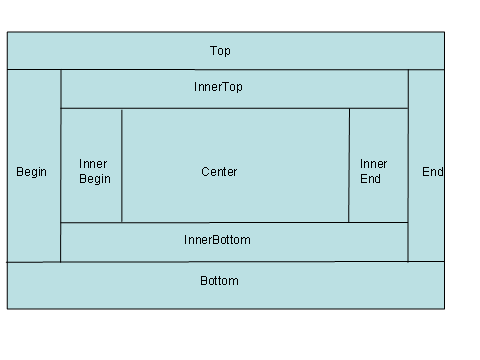
Using PageLayout you can define different areas of a view as shown in the graphic below.
PageLayout only should be used to define the layout of a main view and should not be nested.
You can insert the following page panels:
● Type PagePanel: Begin, InnerTop, InnerBegin, Center, InnerEnd, InnerBottom, End
● Type PageFullWidthPanel: Top, Bottom. These panels always span the entire width of a view. Therefore no width property is provided.
You can fill the panels using
● individual containers or
● inserting views using ViewContainerUIElement.
Procedure
In...
1. In the ViewDesigner in the Outline view open the context menu of the RootElement and select Replace with and subsequently PageLayout.
2. Open the context menu of the RootElement again, select Insert and select the desired PagePanels.