Stopping
Applications
Stopping
Applications

There are three ways of terminating a Web Dynpro application:
· Triggering an exit plug from an interface view. When the application is stopped using the exit plug, the navigation controlled by the application is called one last time to display a user-defined last page.
· Executing a redirect when using an exit plug. In this case, the value of the application property LogoffURL must be passed as the parameter URL for the exit plug. Note that the user is not logged off when the Web Dynpro application is terminated by an exit plug call.
· Calling the methodWDClientUser.forceLogoffClientUser(null). This method determines the Web address defined in LogoffURL and redirects the user to this address.The user is automatically logged off. If the application property LogOffURL is not defined, the logoff page predefined by Web Dynpro is displayed.
Prerequisites
Web Dynpro DC, the required component with interface view as well as the view user interface units have been defined.
Procedure
The following steps describe how to terminate the application using an exit plug with a parameter defined for the URL. This procedure is recommended by SAP, because after the termination of a Web Dynpro application the user is not logged off when executing a Web Dynpro application on the NetWeaver Portal.
1. Define the plug on the interface view of the implementing window.The plug must be of type "Exit" and must have a parameter "closeWindow" of type boolean which gets the value "true".
2. Define the same plug, (without changing the parameter name, type and plug type)
on the window in which your view is contained.
Note:
While defining the plug in window, you would see only the 'standard' type.
In that case, create the plug by keeping the type as 'standard'. Now after creation,
edit the plug and change the type to 'exit'.
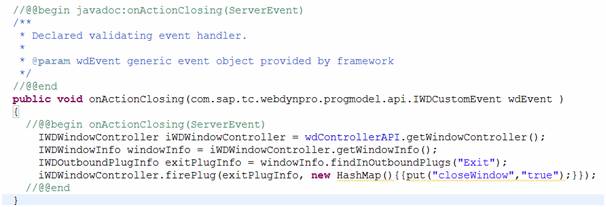
3. To trigger the plug, create a controller reference from your view to the
window and call the trigger method on the window controller from your
view controller.
Example:
ComponentName: Sample
InterfaceViewName: SampleInterfaceView
ViewName: SampleView
WindowName: SampleWindow
ExitPlugName: ExitSample
4. Define the plug "ExitSample" of type "Exit" on the interface view of the implementing window. The plug must be of type "Exit" and must have a parameter "closeWindow" of type boolean which gets the value "true".
5. Define the same plug "ExitSample" (without changing the parameter name, type and type of plug) on the window in which your view is contained.
6. To trigger the plug, create a controller reference from your view to the window and call the trigger method on the window controller from your view controller.